At a glance
What we built
Up for Jobs connects employers and freelancers across web and mobile, from posting a role and reviewing bids to interviews and hiring.
| Product | Up for Jobs |
|---|---|
| Interfaces shown | Mobile · Desktop / web |
| Technology | Web and mobile product interfaces |
| Core work | Employer web hiring workspace · Freelancer discovery, bids and interviews · Mobile job search and application journeys |
Product flow
How it works
Employer web hiring workspace
Freelancer discovery, bids and interviews
Mobile job search and application journeys
The interface
Inside the product
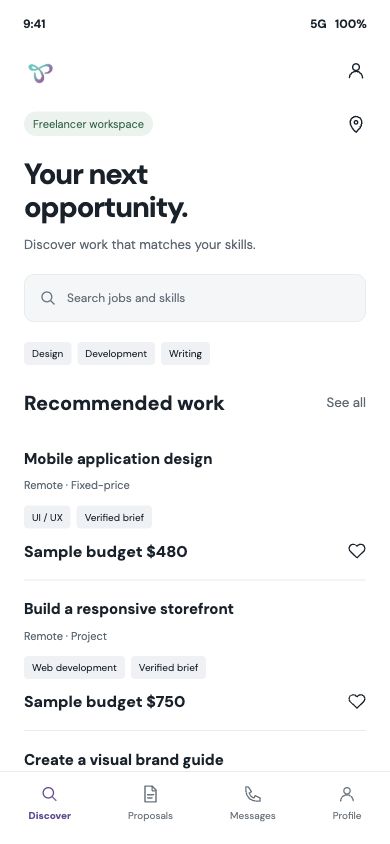
Mobile interface · 01
Mobile job discovery
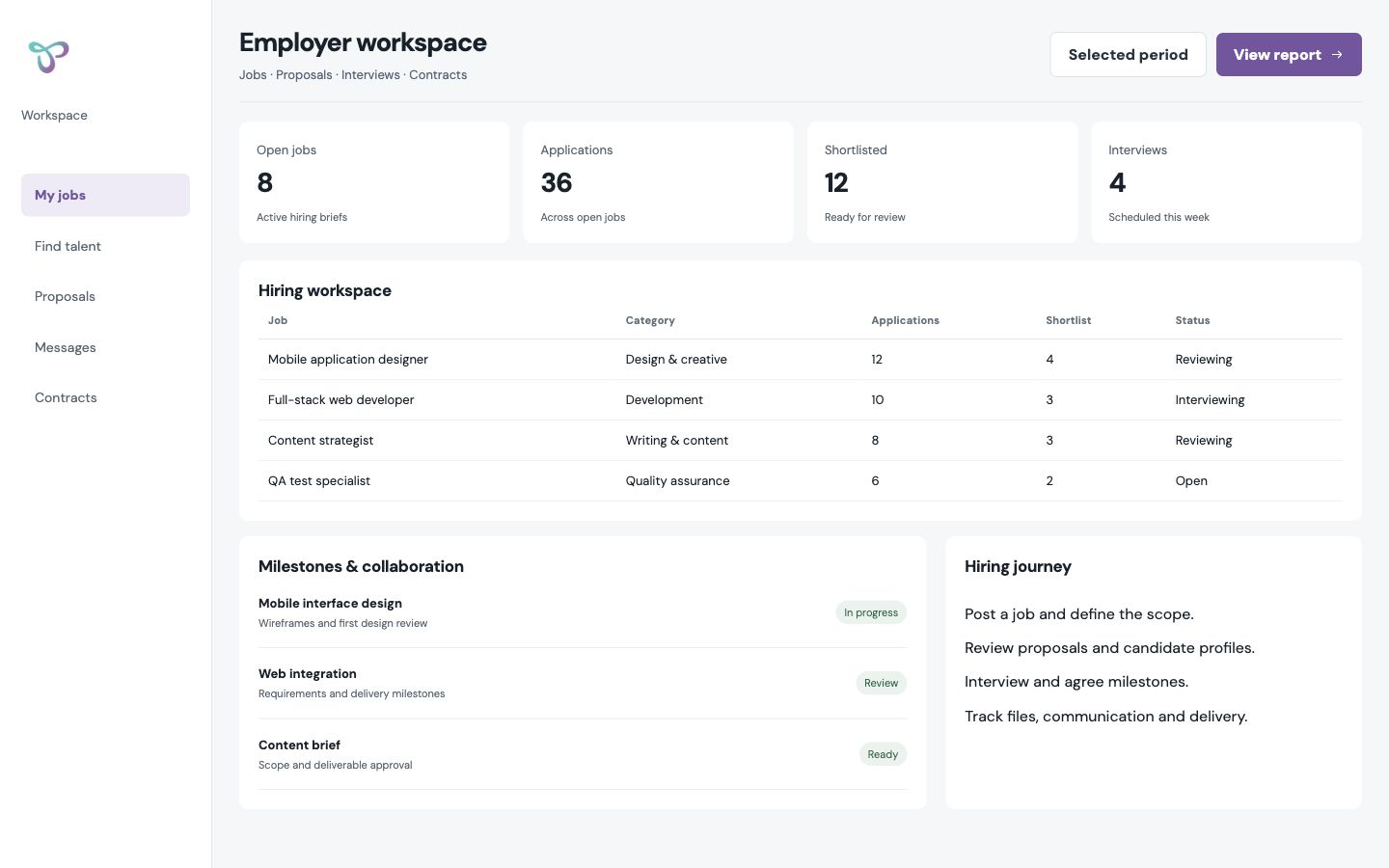
Desktop interface · 02
Employer hiring workspace
Design notes
Decisions behind the experience
Two-sided hiring
Give employers and freelancers different starting points
- Employer web workspace
- Freelancer mobile journey
- Search and project-posting entry points
Read the context
An employer begins with work that needs doing; a freelancer begins with opportunities that fit their skills. The marketplace design had to connect those perspectives without forcing both sides through the same navigation. The employer workspace is organised around a role, candidates and progress, while the mobile freelancer journey makes discovery and response immediate.
The marketplace covers both browsing for a person and posting a project. That distinction matters: sometimes the buyer already knows the skill they need, and sometimes they need to describe the work first and let the marketplace surface suitable talent.
Employer journey
Describe the work before comparing people
- Category, title and detailed brief
- Budget and skills
- Profiles, bids and interviews
Read the context
The posting flow starts with a category, title and description, then asks whether the work is a project or a contest. Budget type and additional skills sharpen the brief before a final review. Attachments give the employer a way to show the work, not merely describe it in a short text box.
The hiring flow then turns to freelancer profiles, reviews, bids and interviews. These are comparison tasks, so the employer screens put candidate information and project context together. The employer can see how a person fits the brief before moving to a hiring decision.
Freelancer journey
Make relevant work findable and actionable
- Skill-led discovery
- Job application and proposal
- Milestone and delivery planning
Read the context
The freelancer side begins with job discovery and application. Skill relevance shapes which opportunities deserve attention, while mobile screens keep the job close to the profile and proposal a freelancer will use to respond.
The design also considers the work after a match. Milestones, scope agreement and files belong to a project workspace, because a successful hiring product has to support delivery as well as discovery. Those stages cannot be collapsed into a single 'hire' button.
Interface decisions
Use the right density for each role
- Web comparison workspace
- Mobile opportunity view
- Job-to-candidate continuity
Read the context
Employers need a broad view of applicants and hiring progress, which suits a web workspace. Freelancers often make the first response from a phone, so mobile job cards and application steps prioritise fit and the next action. The two interfaces reflect that split in how information is presented.
Employer posting, talent search and freelancer notification flows define a marketplace where the opportunity remains understandable as it moves from brief to candidate discussion and delivery.
Design and development
What powers it
Platform and technology
Web and mobile product interfaces
Core capabilities
- Employer web hiring workspace
- Freelancer discovery, bids and interviews
- Mobile job search and application journeys
Questions about the product
Questions about this product
What does this product help people do?
Help employers move from an open role to a considered shortlist of freelancers.
Which screens can I explore?
Mobile job discovery, Employer hiring workspace.
What capabilities are covered?
Employer web hiring workspace, Freelancer discovery, bids and interviews, Mobile job search and application journeys.
Mobile projects