At a glance
What we built
A consultation journey has two clocks: patients need to find an appropriate specialist and book a usable time, while clinicians need a reliable view of their availability and upcoming appointments. Keeping these flows separate makes a booking easy to misunderstand or lose.
| Product | Second Opinion |
|---|---|
| Interfaces shown | Mobile |
| Technology | React Native · Laravel API · Firebase · Agora · Android & iOS |
| Core work | Doctor discovery and appointment booking · Separate patient and clinician workspaces · Medical records, chat and video consultations |
Product flow
How it works
Doctor discovery and appointment booking
Separate patient and clinician workspaces
Medical records, chat and video consultations
The interface
Inside the product
Mobile interface · 01
Choose a clinician and a time
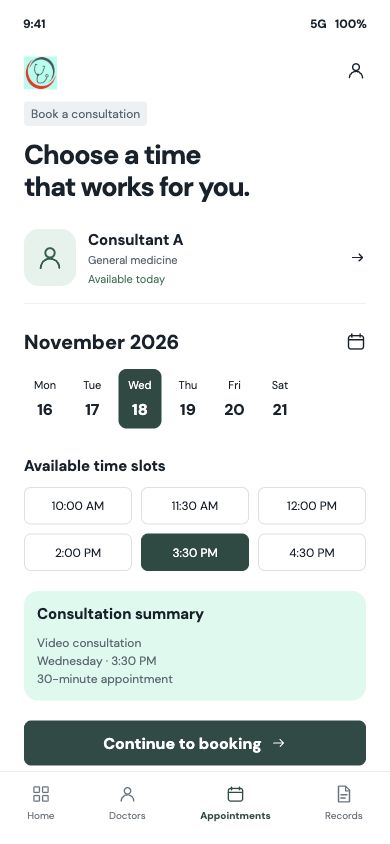
The patient moves from specialist discovery into a dated appointment slot, keeping the clinician and selected time together.
Mobile interface · 02
Set clinician availability
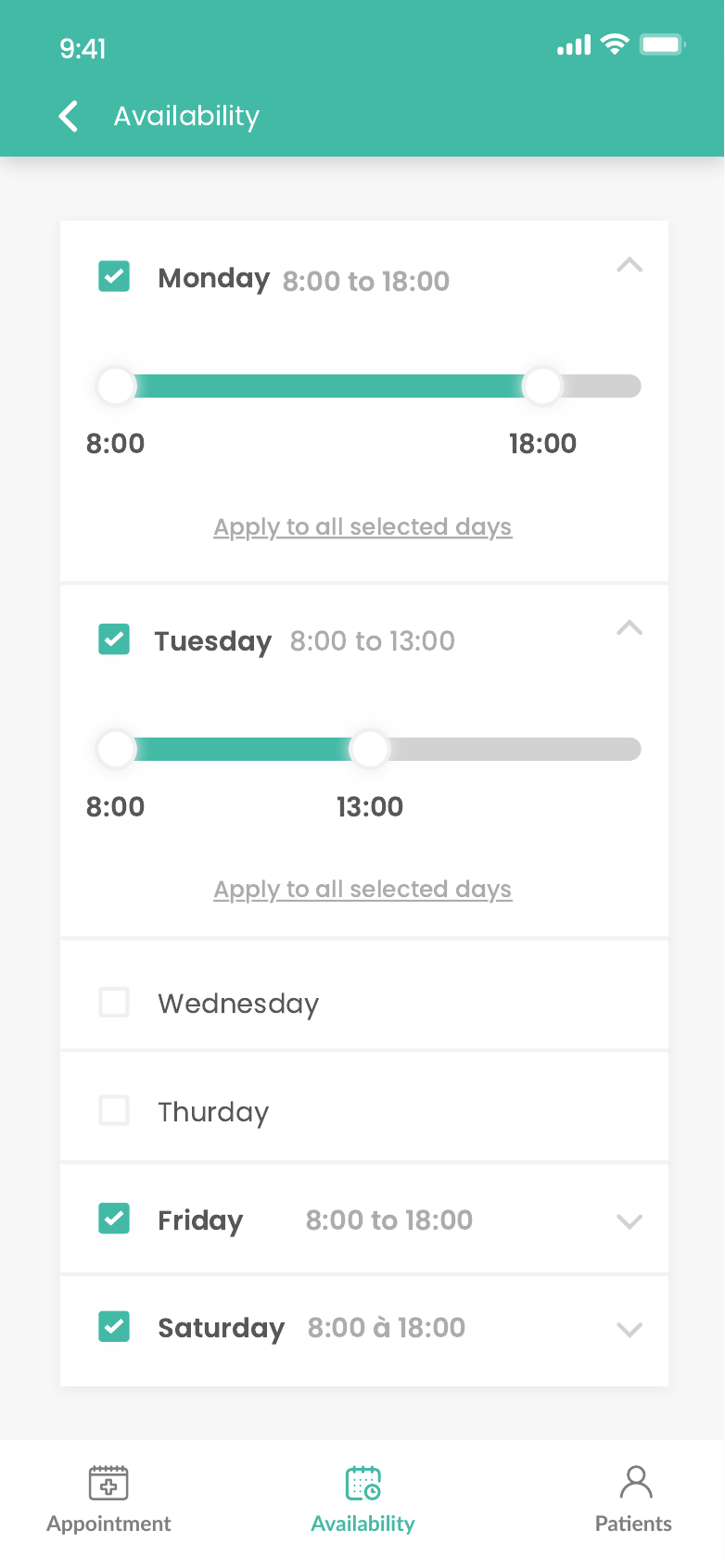
The clinician side offers weekly availability controls so the bookable schedule starts from actual working hours.
Design notes
Decisions behind the experience
The brief
A consultation begins before the call
Read the context
The product brings patients and clinicians into one care journey, but each side has a different decision to make. A patient needs to find an appropriate specialist, understand when that person is available and make an appointment with confidence. A clinician needs control over working hours, a reliable appointment list and the relevant patient context before the consultation begins.
That made the booking flow the centre of the experience. Discovery, scheduling, records and remote contact had to connect to the same appointment rather than ask either person to piece the journey together across separate tools.
Patient journey
From specialist search to a selected time
- Find a clinician by specialty and review their profile.
- Choose an available date and slot before booking.
- Review upcoming care, reschedule when needed and access shared records.
Read the context
The patient path starts with doctor and specialty discovery. Search and filtering narrow the directory, while the clinician profile gives the patient a place to review the person behind an available slot. A date is useful only when it leads to a real appointment choice, so the next screen keeps the clinician, consultation type and available times together.
After choosing a slot, the booking flow carries those details into review and payment. Patients can return to upcoming or past appointments, request a change when plans move, and keep relevant files close to the care interaction. The app also includes a route for booking on behalf of a family member, an important distinction when the account holder and the person receiving care are different.
Clinician workflow
The other side of every appointment
- Set availability and review the appointment calendar.
- Manage appointment changes and patient context.
- Work with shared records, chat and video consultation.
Read the context
Clinician registration collects professional information and documents before the practitioner enters the working dashboard. Their schedule is managed separately from the patient's booking form: availability determines which slots can be offered, while the appointment view shows what has been requested, confirmed, cancelled or moved.
The clinician can open a patient record, review files shared for care, add notes or records and use the communication tools around the consultation. Keeping these actions tied to the patient and appointment gives the practitioner a practical workspace for preparation and follow-up, rather than a calendar that ends at the start time.
Product structure
One service, two clear interfaces
Read the context
The mobile navigation gives patients quick access to clinician discovery, appointments and records. On the practitioner side, the emphasis shifts to appointments, patients, availability and files. This separation keeps a patient's search task from crowding a clinician's daily work.
The scheduling screens make the next decision visible: a clinician and slot for the patient, a working period and appointment status for the clinician. Record sharing and remote contact then extend that same care relationship beyond the booking screen.
Design decisions
Make time and context easy to read
Read the context
A consultation screen has to communicate more than a date. The patient needs to see who they will speak to, when the session happens and what happens after they continue. The booking design therefore presents specialist identity, date choices, available times and a short consultation summary in one reading order.
The clinician's availability view uses day-by-day controls because working patterns vary. Its controls are distinct from appointment cards, so changing a work schedule does not feel like editing an existing patient's booking. This distinction also gives each screen a single job at the moment it is used.
Development
Connecting mobile care to the service behind it
- React Native mobile applications for patient and clinician flows.
- Laravel API for discovery, availability, bookings and records.
- Firebase authentication and messaging; Agora video integration.
Read the context
The patient and clinician applications were built in React Native for iOS and Android. A Laravel API provides the service routes for profiles, practitioner search, availability, appointments, records and payments. Firebase packages support sign-in and messaging, while Agora is included for video consultation.
The architecture follows the product's two-role design. Mobile screens carry the immediate decisions, and the API maintains the appointment and patient context those decisions create. The important handoff is not merely opening a video call; it is carrying the chosen clinician, time and relevant information from discovery into the consultation and subsequent record.
Design and development
What powers it
Platform and technology
React Native · Laravel API · Firebase · Agora · Android & iOS
Core capabilities
- Doctor discovery and appointment booking
- Separate patient and clinician workspaces
- Medical records, chat and video consultations
Questions about the product
Questions about this product
What does this product help people do?
Patients can find a clinician and choose a time, while the clinician has a separate view of availability and appointments.
Which screens can I explore?
Choose a clinician and a time, Set clinician availability.
What capabilities are covered?
Doctor discovery and appointment booking, Separate patient and clinician workspaces, Medical records, chat and video consultations.
Mobile projects