At a glance
What we built
An investment product has to make the path from browsing an asset to understanding a holding legible. Discovery, asset information and a personal portfolio cannot feel like unrelated views.
| Product | Collectvest |
|---|---|
| Interfaces shown | Mobile |
| Technology | Flutter · Mobile application · Web experience |
| Core work | Browse asset categories and details · Review holdings and transaction activity · Wallet and account-management experiences |
Product flow
How it works
Browse asset categories and details
Review holdings and transaction activity
Wallet and account-management experiences
The interface
Inside the product
Mobile interface · 01
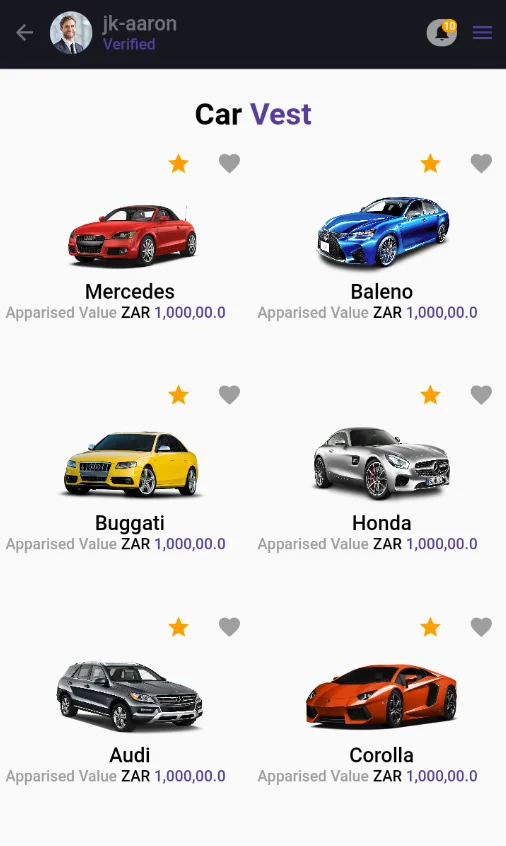
Discover collectible assets
The category-led catalogue design helps members compare assets before opening an individual opportunity.
Mobile interface · 02
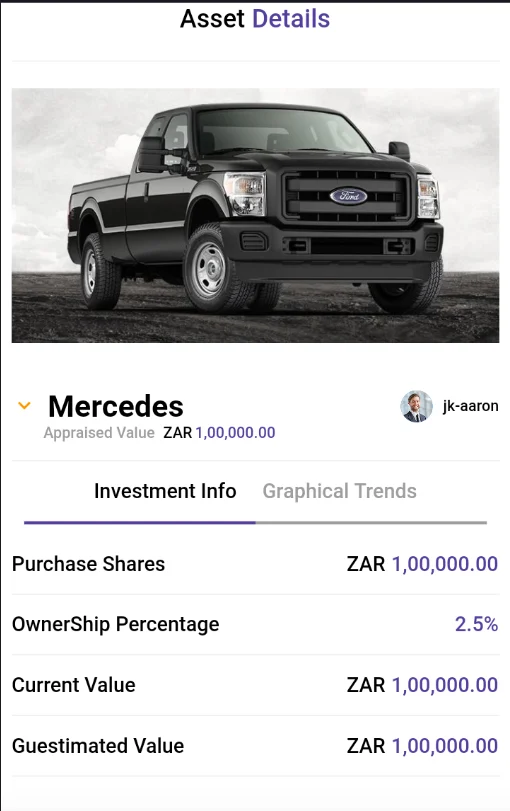
Examine an opportunity
The asset detail design brings imagery, appraised value, ownership information and investment details into one view.
Mobile interface · 03
Return to holdings
A separate holdings design groups assets associated with the member's account, keeping personal positions apart from the open catalogue.
Mobile interface · 04
Manage wallet activity
The wallet design provides a dedicated route for funding and withdrawal alongside the member's investment activity.
Mobile interface · 05
Begin the member journey
The mobile app starts with a two-step registration flow. The first step gathers account credentials and a mobile number, with consent presented before the member continues.
Design notes
Decisions behind the experience
The product model
Make an asset understandable before it becomes a holding
- Member registration
- Asset categories and detail
- Personal holdings and wallet
Read the context
The investment experience has two linked contexts. Before a member takes action, they need to understand an opportunity; afterwards, they need to recognise it in their own holdings and account activity. The product therefore begins with category-led discovery and keeps asset detail separate from the personal portfolio.
Original mobile material shows that the service also has an onboarding journey. Registration and verification establish a member account before the more personal wallet and holdings views become relevant. The design treats those steps as part of the investment experience, not as an unrelated sign-up screen.
Member journey
Move from discovery to account context
- Staged account entry
- Search and category browsing
- Holdings, wallet and transaction views
Read the context
A new member enters through a staged account flow, then browses categories and opens an asset to see its context. Search helps when the member knows what they want; category browsing helps when they are exploring. Both routes lead to a detail page rather than asking a small card to explain the whole opportunity.
The holdings view changes the question from 'what is available?' to 'what do I own?'. Wallet and transaction activity provide the account context around that position. These remain distinct destinations so discovery does not become overloaded with ledger detail.
Service operations
Keep a member's activity connected to the asset
- Asset information
- Member account state
- Holdings and transaction continuity
Read the context
The user stories and interface material describe a service where asset information, member identity, holdings and account activity must agree. Staff need a consistent way to present opportunities and reconcile the movement that follows a member action. That makes the account view an operational part of the product, not a decorative dashboard.
The design separates public opportunity content from personal balances and transactions. A member can inspect an asset in the catalogue, then return later to the same asset in their own holdings. This continuity gives the service a clearer customer relationship after initial discovery.
Interface and technology
Different screen weights for browsing and finance
- Flutter mobile interface
- Supporting web experience
- Distinct catalogue, holdings and wallet layouts
Read the context
Discovery screens lead with imagery and categories. Asset detail gives more space to facts and decisions. The holdings and wallet screens use tighter structure because account review is a different task from browsing. Registration, catalogue, detail, portfolio and wallet each have a clear place in the mobile journey.
The product materials identify a Flutter mobile application and a supporting web experience. The mobile interface holds the member journey together while the service behind it carries the asset and account records that make those views meaningful.
Design and development
What powers it
Platform and technology
Flutter · Mobile application · Web experience
Core capabilities
- Browse asset categories and details
- Review holdings and transaction activity
- Wallet and account-management experiences
Questions about the product
Questions about this product
What does this product help people do?
Explore collectible assets, examine the details of an opportunity and return to a personal holdings view.
Which screens can I explore?
Discover collectible assets, Examine an opportunity, Return to holdings, Manage wallet activity.
What capabilities are covered?
Browse asset categories and details, Review holdings and transaction activity, Wallet and account-management experiences.
Mobile projects