At a glance
What we built
A rental marketplace has to keep the renter's choice of vehicle and dates aligned with the host's listing and the operator's booking record. The hard part is not the catalogue screen; it is preserving one understandable transaction across all three sides.
| Product | PICK |
|---|---|
| Interfaces shown | Android & iOS apps · web renter UI · admin dashboard |
| Technology | React Native · Android & iOS · Web UI/UX · Angular · .NET API |
| Core work | Location search and vehicle booking · Host, wallet and trip workflows · Administration, payments and reporting |
Product flow
How it works
Search by location and rental dates
Review a vehicle, price and host
Confirm and manage the booking
The interface
Inside the product
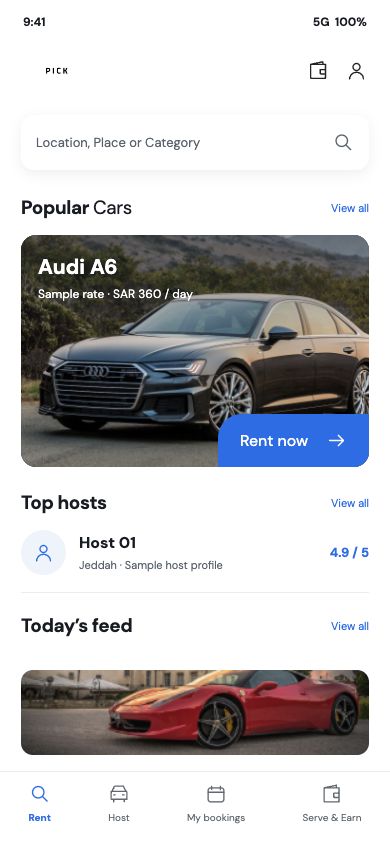
Mobile interface · 01
Discover a car from the mobile app
A mobile renter-home visualization based on the handover's screen structure and product assets. The vehicle, host and rate shown here are illustrative sample content.
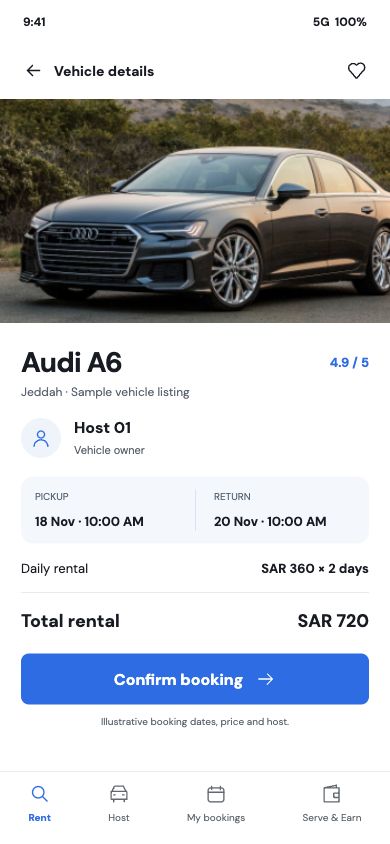
Mobile interface · 02
Review the vehicle before booking
A representative mobile booking view keeps the car, host, rental period and total in one place. Its names, dates and prices are illustrative sample content.
Desktop interface · 03
Start with location and rental timing
The web entry keeps the location, pickup time and return time visible before a renter searches for a car.
Desktop interface · 04
Compare locations with filters
The web results layout connects vehicle search with price, booking and delivery filters and a map of the selected area.
Desktop interface · 05
See the work behind a booking
The administration dashboard brings booking states, customer accounts, vehicle owners, inventory and payments into one operational view.
Design notes
Decisions behind the experience
The product idea
A rental journey with a place for everyone involved
- Renter search and vehicle selection
- Host listings and trip management
- Booking, payment and operations workspace
Read the context
A vehicle marketplace begins with a renter's practical question: which car is available where and when I need it? The product brings location, rental dates and vehicle choice together before asking the renter to commit. A host sees a different side of the same transaction, with a vehicle to list and bookings to manage. The operations team needs to understand both views at once.
That three-sided structure shaped the experience. Search and comparison stay light enough for a phone, while listing, handover and booking records carry the detail required to complete the rental. The resulting journey connects discovery with the work that happens after a reservation is made.
Renter journey
From a location and date to a car worth booking
- Choose pickup and return details
- Compare vehicles in list and map views
- Review the selected rental before booking
Read the context
The search opens with a starting point and pickup and return times. The renter can also express a different drop-off city or request delivery to their door. These choices define a useful set of vehicles before the results appear, so the catalogue is tied to an actual trip rather than a generic inventory page.
Results can be scanned as a list or explored on a map. A listing exposes the car, daily price, pickup details and key specifications. The selected vehicle keeps the dates and price in view as the renter reviews the host and confirms the reservation. Dedicated search, map, calendar and vehicle detail views give each decision a clear place in the mobile journey.
Host experience
Turn a vehicle into an available listing
- Add vehicle details, imagery and location
- Review cars and booking activity
- Manage communication, handover and wallet activity
Read the context
For a host, the first job is supplying a listing that renters can judge. The mobile flow separates vehicle details, photos and location, then returns the host to a dashboard and a view of their cars. This gives supply-side work its own sequence instead of hiding it inside the renter's search experience.
Booking cards, trip checks and messages support what happens when someone chooses a vehicle. The source also includes wallet views, so account activity has a destination alongside the vehicle and reservation records. These are connected parts of one rental lifecycle: prepare the vehicle, respond to a booking, complete the handover and review the resulting activity.
Marketplace operations
One booking record across mobile and administration
- Review booking states and transaction details
- Manage owners, vehicles and customer accounts
- Track payments and marketplace reporting
Read the context
The administration workspace gives the team a wider view of the marketplace. Bookings, vehicle owners, users, vehicles and payments are distinct management areas, while reporting and tracking make it possible to review activity beyond a single reservation. A booking created on mobile becomes an operational record that can be found and handled in the desktop system.
That handoff matters because a rental is more than a checkout event. Pickup, return, cancellation and owner response all change what the team needs to see. The system's separate renter, host and administrative views keep those decisions legible without requiring every user to navigate the same dense interface.
Design and engineering
Three interfaces, one shared service
- React Native mobile applications for Android and iOS
- Web renter UI and Angular administration workspace
- .NET API for vehicles, bookings, users and payments
Read the context
The mobile application is built in React Native for Android and iOS. Renter and host routes share a foundation but present different tasks: quick location-led discovery for one side, detailed vehicle and booking management for the other. A web renter experience was designed alongside the mobile journeys. The Angular administration application gives staff a denser desktop view, while a .NET API carries the common booking, vehicle, account and payment data.
The architecture follows the transaction. Vehicle data feeds search and detail, booking data links dates with a selected car, and account and wallet records keep activity connected after a trip is arranged. The UI follows the same logic: broad choices first, then increasingly specific information where a renter, host or operator needs to make a decision.
Design and development
What powers it
Platform and technology
React Native · Android & iOS · Web UI/UX · Angular · .NET API
Core capabilities
- Location search and vehicle booking
- Host, wallet and trip workflows
- Administration, payments and reporting
Questions about the product
Questions about this product
What does this product help people do?
Renters can discover cars, review a vehicle and choose rental dates; hosts and the operations team have their own paths through the same service.
Which screens can I explore?
Discover a car from the mobile app, Review the vehicle before booking, Start with location and rental timing, Compare locations with filters.
What capabilities are covered?
Location search and vehicle booking, Host, wallet and trip workflows, Administration, payments and reporting.
Mobile projects