At a glance
What we built
Gital ELD connects driver duty records and vehicle activity with the fleet tools needed to manage logs and review journeys.
| Product | Gital ELD |
|---|---|
| Interfaces shown | Mobile · Desktop / web |
| Technology | Device protocol · Mobile · Web management |
| Core work | Driver logs and duty-status journeys · Device and vehicle connectivity · Fleet, location and log administration |
Product flow
How it works
Driver logs and duty-status journeys
Device and vehicle connectivity
Fleet, location and log administration
The interface
Inside the product
Mobile interface · 01
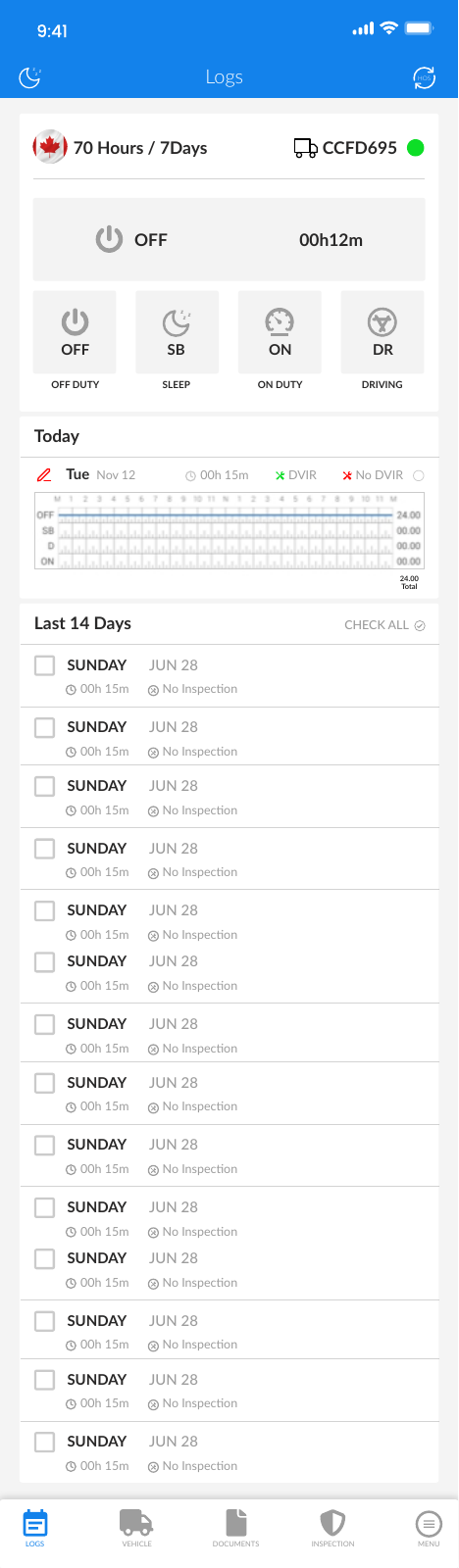
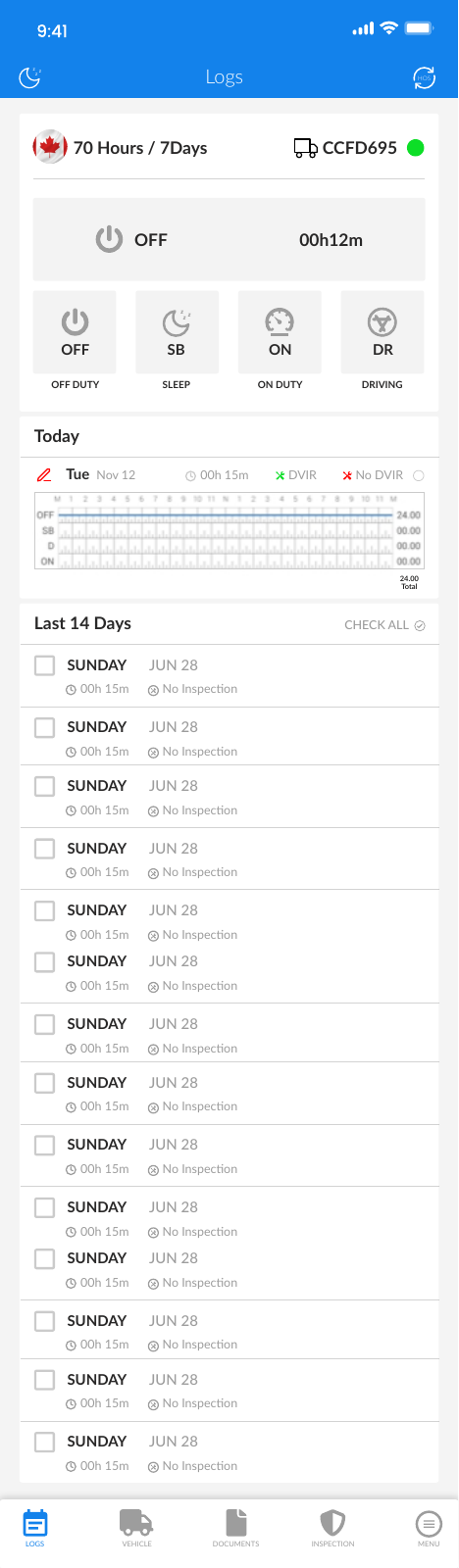
Driver logs and duty-status journeys
Mobile interface · 02
Review a driver's daily record
The mobile duty view focuses on status and log activity for a driver in the field.
Desktop interface · 03
See the fleet on a map
The management view combines driver status, search and location in a desktop workspace.
Design notes
Decisions behind the experience
The fleet problem
Give a driver a daily record and a fleet team a wider view
- Driver duty-status view
- Hours and inspection records
- Fleet driver and vehicle overview
Read the context
A driver needs to know their current duty state and recent log activity while working. A fleet supervisor needs to see many drivers, vehicles and records at once. The product separates those jobs into a mobile driver experience and a denser web management workspace.
The mobile interface includes sign-in, duty status, hours-of-service information and inspection activity. The web interface shows a searchable driver list, duty states, location and log destinations. Together, they make the same operating record useful from two very different positions.
Driver journey
Make the current state easy to read
- Clear duty-state choices
- Daily and recent logs
- Vehicle inspection path
Read the context
The mobile screen puts off-duty, sleeper, on-duty and driving states close to the day's log. Recent activity and remaining hours are visible where a driver can understand the record without navigating a reporting console. A vehicle inspection has its own entry rather than being buried in a generic notes field.
Device and vehicle connectivity are part of the wider ELD workflow. The interface needs to present that data alongside a driver's own actions, so a recorded status can be inspected and understood later by the person responsible for it.
Fleet operations
Find the exception behind a summary
- Searchable driver list
- Location history and map
- Logs, inspections and ELD events
Read the context
The web workspace organises drivers by status and lets staff search for a person. Location history, logs, inspections and ELD events are separate destinations, giving supervisors a path from the fleet overview to the underlying record.
A map answers where vehicles are; a log answers what happened over time. The desktop design does not try to make one visual do both jobs. It places status, location and record review within the same administration structure so teams can follow an issue to its detail.
Design and build
Two interfaces around one operational record
- Mobile driver interface
- Web fleet management
- ELD device and data protocol work
Read the context
Driver screens favour large status labels and a short action path. Fleet screens use tables, filters and map context because comparison across vehicles is the primary task. The mobile and web interfaces make that split visible.
Device and vehicle data feed a mobile and web product designed for ongoing record review. The ELD protocol informs how the resulting logs can be read beyond the driver's immediate screen.
Design and development
What powers it
Platform and technology
Device protocol · Mobile · Web management
Core capabilities
- Driver logs and duty-status journeys
- Device and vehicle connectivity
- Fleet, location and log administration
Questions about the product
Questions about this product
What does this product help people do?
Give drivers a legible duty record while fleet teams keep vehicles and logs in view.
Which screens can I explore?
Driver logs and duty-status journeys, Review a driver's daily record, See the fleet on a map.
What capabilities are covered?
Driver logs and duty-status journeys, Device and vehicle connectivity, Fleet, location and log administration.
Mobile projects