At a glance
What we built
A reporting integration turning access-control records into attendance summaries, adjustment requests, approvals and administrative reporting.
| Product | Hikvision reporting |
|---|---|
| Interfaces shown | Desktop / web |
| Technology | .NET · SQL Server · Angular |
| Core work | Raw attendance and summary reports · Adjustment and sign-off workflows · Users, groups, contracts and working hours |
Product flow
How it works
Raw attendance and summary reports
Adjustment and sign-off workflows
Users, groups, contracts and working hours
The interface
Inside the product
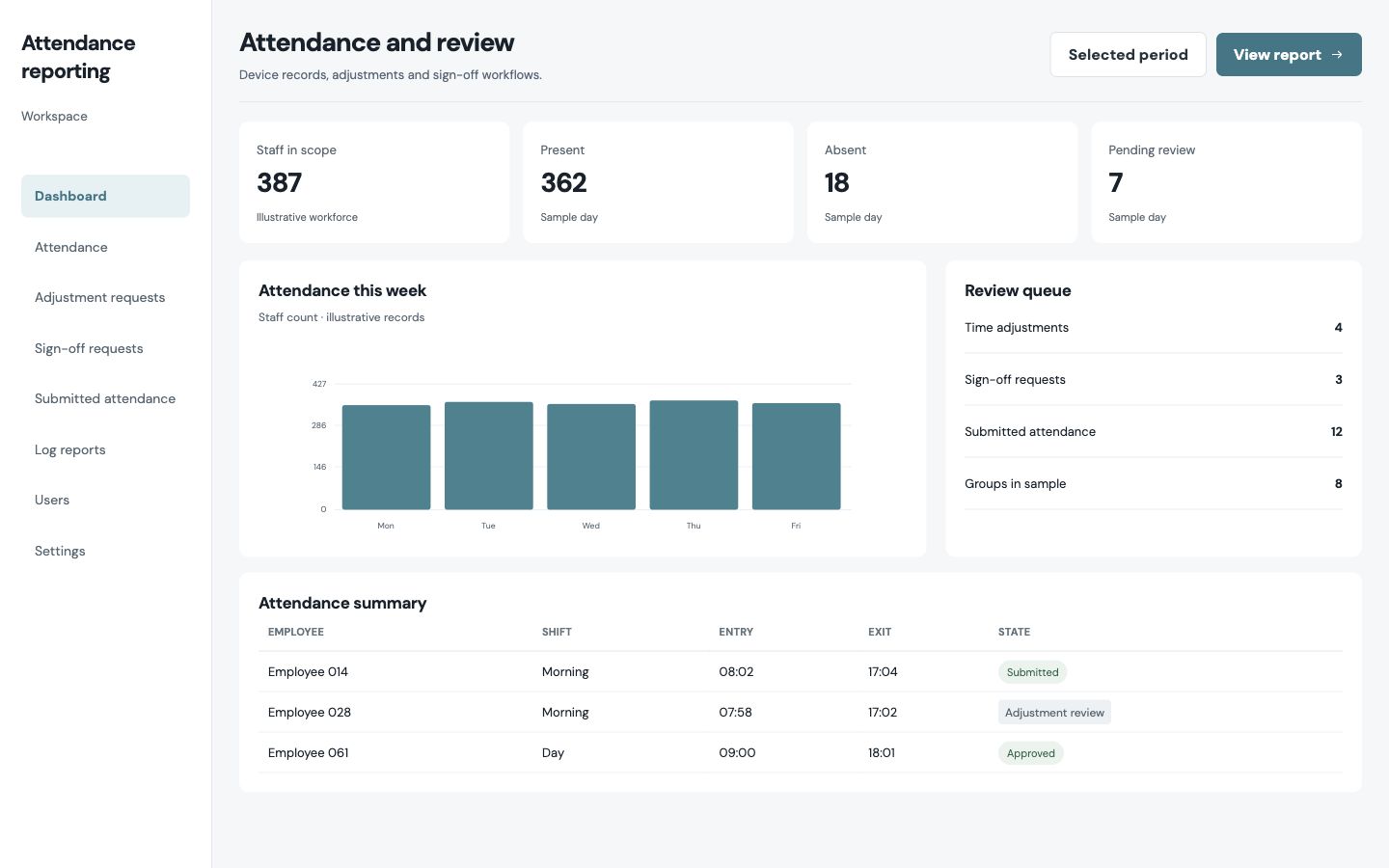
Desktop interface · 01
Raw attendance and summary reports
Design notes
Decisions behind the experience
The reporting challenge
Make attendance records explainable
- Raw and summary attendance
- Adjustment reports
- Sign-off requests and logs
Read the context
Access-control events are only the beginning of an attendance decision. A manager needs to understand scheduled hours, actual entry and exit, productive time, breaks and any exception before signing off a summary. This reporting portal puts those layers into a reviewable workflow.
The dashboard, adjustment reports, submitted attendance, sign-off requests, logs, users and settings keep the raw record, the interpreted summary and the decision about a correction in different but connected places.
Manager journey
Move from a summary to the underlying event
- Filter attendance records
- Inspect time and shift context
- Review adjustments and sign-off
Read the context
The attendance table presents group, shift, contracted hours and recorded times together. Filters let a manager narrow the view before opening an exception. This is a comparison task, so the interface favours readable rows and clear labels over a decorative chart-led dashboard.
When a record needs correction, the adjustment path creates a specific item for review. A sign-off request gives the decision its own status, while the log report helps staff trace the change after it has been made.
Operational rules
Interpret events against the working arrangement
- People and groups
- Contracted hours and absence types
- Consistent review comments
Read the context
The settings areas hold people, entry and exit groups, contracted hours, absence types and standard comments. These are not peripheral preferences; they determine how an access event should be understood for a particular employee or team.
Keeping those rules in the same portal helps administrators avoid reconciling one set of attendance records against another set of policies in separate documents. It also makes a disputed result easier to investigate because the working context is close to the report.
Engineering and interface
A central workspace for record and approval
- Angular interface
- .NET Core services
- SQL Server records
Read the context
The product uses a dense desktop table because a supervisor may need to compare many employees and shifts in one sitting. Navigation separates reporting, corrections and administration while keeping them inside one system.
The stack is .NET Core, Microsoft SQL Server and Angular. The technical structure connects attendance information with the review and approval states people need to trust the final report.
Design and development
What powers it
Platform and technology
.NET · SQL Server · Angular
Core capabilities
- Raw attendance and summary reports
- Adjustment and sign-off workflows
- Users, groups, contracts and working hours
Questions about the product
Questions about this product
What does this product help people do?
Turn attendance records into summaries that a team can review, adjust and approve.
Which screens can I explore?
Raw attendance and summary reports.
What capabilities are covered?
Raw attendance and summary reports, Adjustment and sign-off workflows, Users, groups, contracts and working hours.
Enterprise projects