
At a glance
What we built
Executed Karachi’s largest on-vehicle advertising campaign for Coca-Cola, mobilising 900+ vehicles. Campaign work also spans Sprite and other major brands.
| Product | OVA campaigns |
|---|---|
| Interfaces shown | Mobile · Product photography |
| Technology | React Native Android app · Location services · Campaign API |
| Core work | Driver sign-in and registration · Start and stop travel activity · Location updates for branded vehicles |
Product flow
How it works
Vehicle activity and route tracking
Coverage heatmaps and campaign reporting
Branded fleet mobilisation and field execution
The interface
Inside the product
Mobile interface · 01
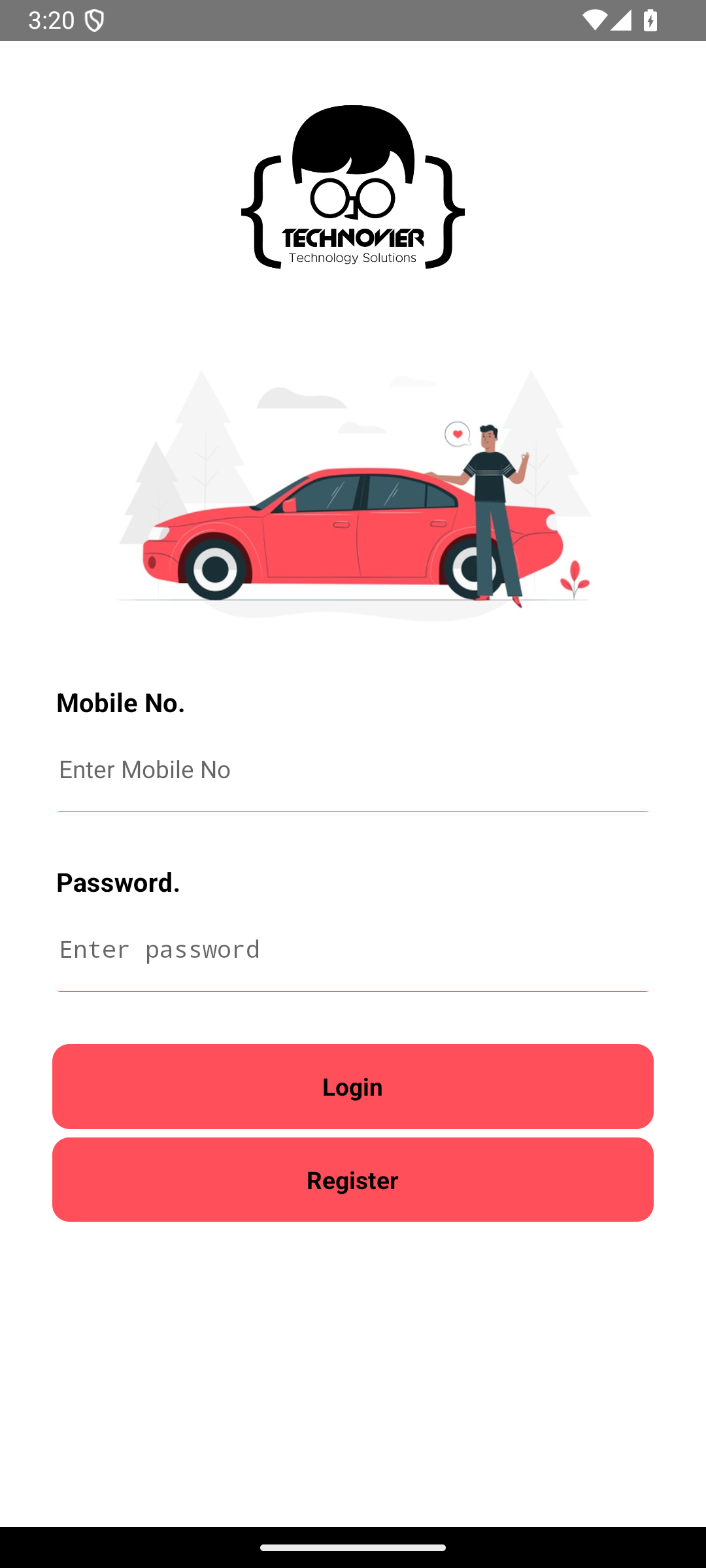
Driver sign-in
The original Android release opens with mobile-number sign-in and a direct registration path for participating drivers.
Product view · 02
Campaign creative on a van
Product view · 03
A second vehicle format
Product view · 04
Another campaign message
Design notes
Decisions behind the experience
The campaign
Take the creative into the streets people use every day
- Branded vehicle placements
- Participating drivers
- Travel activity sent from the driver app
Read the context
The on-vehicle campaign put Coca-Cola's Karachi creative onto working cars and vans. The message travelled with the vehicles rather than waiting for an audience to pass a fixed billboard. Different rear-window executions carried the campaign across different vehicle types while keeping the same red-and-white brand system recognisable in traffic.
The physical work and the software had different jobs. The vehicle placement made the campaign visible. The driver application gave the team a way to record when a participating driver was travelling and send location activity to the campaign service. Together, those pieces connected a street-level activation with a record of the vehicle movement behind it.
Driver experience
A simple entry point for the people on the road
- Mobile-number sign-in
- Registration from the app
- Start and stop travelling controls
Read the context
The Android release opens with a mobile-number and password sign-in. A registration path is available from the same screen, so a driver can enter the programme before using the travel controls. This is a practical choice for a field tool: it asks for a small amount of information up front and keeps the driver's main action separate from campaign administration.
Once signed in, the driver-facing control is deliberately direct: start travelling or stop travelling. That action marks the state of a trip while the app works with the phone's location. The interface is about recording participation during normal journeys, not asking the driver to operate a complex reporting dashboard on the road.
Route activity
Turn travel into a record the campaign can review
- Location captured during travel
- Status updates tied to the driver
- Trip end recorded separately
Read the context
The app requests foreground and background location access and uses a background task during travel. Its bundled code sends location and work-status updates to the campaign API, linking the driver's identity, travel state and position. Ending travel sends a separate stop state.
That makes route activity part of the campaign workflow. The driver's start and stop actions establish the journey, while location updates add the movement behind it. Campaign coverage can then be reviewed against where participating vehicles travelled, connecting field execution with a useful operational record.
Campaign production
A consistent idea across different vehicles
- Rear-window creative across vehicle types
- Consistent campaign identity
- Driver activity tied to field execution
Read the context
The campaign photography shows the creative on vans, hatchbacks and sedans. The placement follows each rear window's shape, but the red field, white sweep and Coca-Cola signature stay consistent. The Karachi messages change between executions, giving the fleet variation without losing the campaign identity.
This is where the digital and physical work meet. The artwork has to remain readable from behind a moving vehicle; the participating driver has to be able to start a trip with minimal friction; and the campaign needs a dependable record of travel activity. The case study treats those as connected parts of one activation rather than separate marketing and software projects.
Build approach
An Android field app connected to the campaign service
- React Native Android release
- Web registration and API sign-in
- Background location and travel-status updates
Read the context
The original release package is a React Native Android application. Its sign-in flow calls an API, while registration opens a web form inside the app. After authentication, the travel control uses phone location and a background task to send updates to the service. The implementation keeps the driver action small and leaves campaign coordination to the wider operation.
The build puts two kinds of work in the right places. Drivers get a focused travel control on their phones. The campaign service receives the activity tied to those journeys. That connection makes the visible vehicle placement and its movement part of the same campaign operation.
Design and development
What powers it
Platform and technology
React Native Android app · Location services · Campaign API
Core capabilities
- Driver sign-in and registration
- Start and stop travel activity
- Location updates for branded vehicles
Questions about the product
Questions about this product
What does this product help people do?
Follow a moving campaign from vehicle activity to route coverage and reporting.
Which screens can I explore?
Driver sign-in, Campaign creative on a van, A second vehicle format, Another campaign message.
What capabilities are covered?
Driver sign-in and registration, Start and stop travel activity, Location updates for branded vehicles.
Enterprise projects