Most businesses do not lose money because their ads are bad. They lose money because the system after the click is weak.
The ad works. The click happens. The form gets filled. And then the lead waits. It waits for a reply that comes hours later, or a rep who opens the CRM the next morning, or a follow-up sequence that was never built.
By the time anyone responds, the prospect has moved on or booked with someone faster. The ad did its job. The post-click system did not.
Fixing that system is almost always cheaper than buying more clicks.
Where Lead Leakage Happens
Leakage is rarely one big failure. It is a series of small gaps between the click and the booked conversation:
- Slow response after form submit. The first reply comes in hours, not minutes, and interest has already cooled.
- Leads not synced into the CRM. The form data sits in an inbox or a spreadsheet, so the lead is invisible to the pipeline.
- No instant SMS, WhatsApp, or email. Nothing acknowledges the prospect while they are still on the page and paying attention.
- Sales sees the lead too late. The owner finds out about a hot lead after the window to win it has closed.
- No reminder sequence. One touch goes out, nobody replies, and the lead is never followed up again.
- No missed-call text-back. A prospect calls, no one answers, and there is no automatic text to recover them.
- No booking-link automation. Interested leads have to email back and forth to find a time instead of booking in one click.
- Poor reporting. Nobody can see which leads were followed up, how fast, or which sources actually convert.
Each gap loses a fraction of your leads. Stacked across every campaign, that fraction is often the difference between profitable ads and ads that "don't work."
Why More Ad Spend Does Not Fix It
If the follow-up system is broken, more budget just pushes more leads into the same leaks.
Doubling ad spend doubles the number of prospects who fill a form and never get a timely reply. You pay more to acquire leads and lose the same percentage of them, so your cost per booked conversation stays high or gets worse.
Ad spend amplifies whatever system it feeds. Feed it a leaky post-click system and you amplify the leaks. Fix the system first, and the same budget produces more booked conversations.
The Lead-to-Revenue System
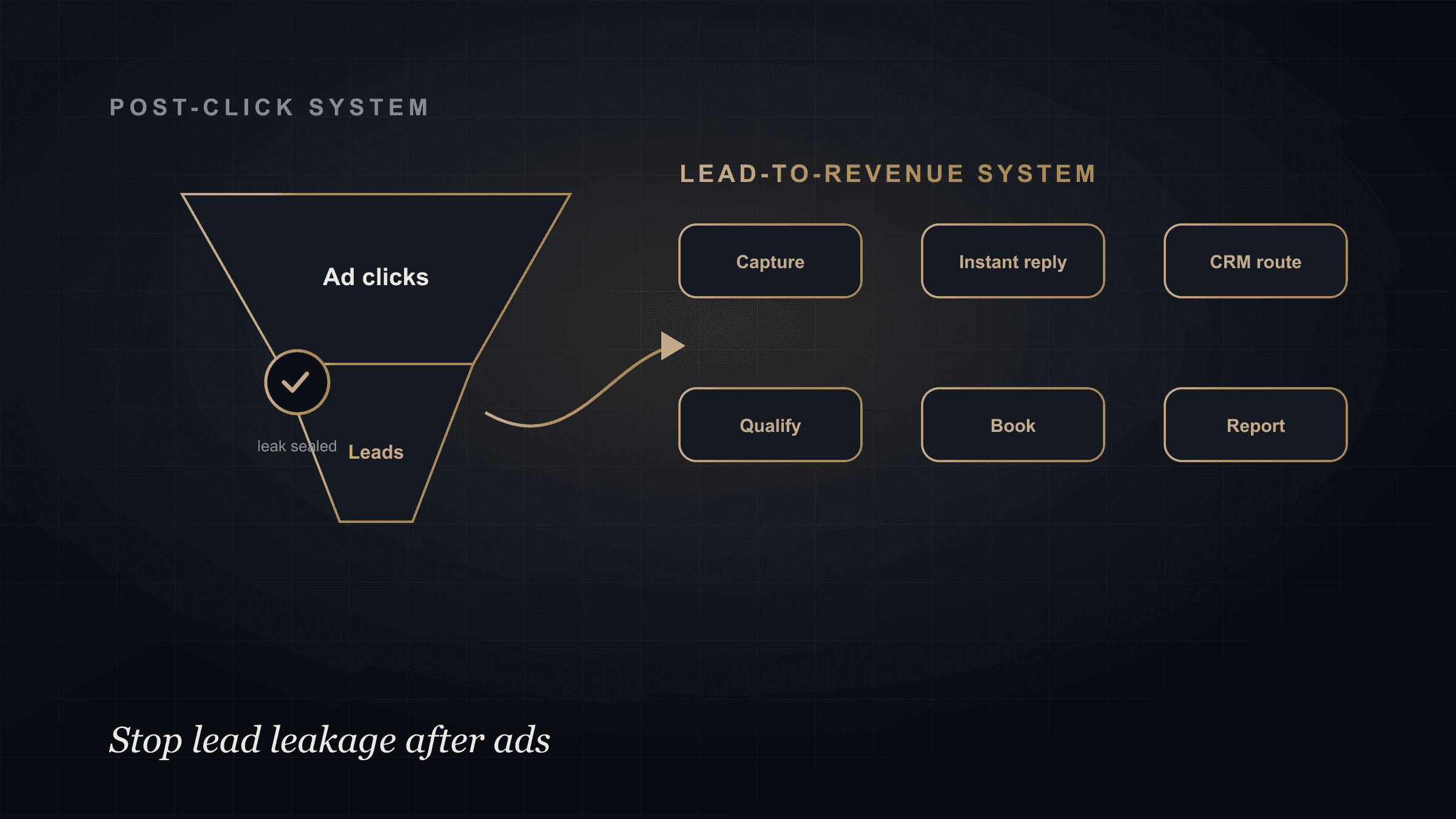
A lead-to-revenue system is the connected path from ad click to booked, tracked opportunity. Every step hands the next one full context, so nothing waits and nothing gets dropped.
1. Capture the lead immediately. The moment the form submits, the lead is recorded with source, campaign, page, and the details they entered. No inbox, no spreadsheet.
2. Validate and enrich the lead. Confirm the contact details and add context such as company, role, and intent signals, so the first touch is informed.
3. Send an instant AI-assisted response. Within seconds, a personalized acknowledgment goes out by SMS, WhatsApp, or email, referencing what the prospect actually asked.
4. Route the lead into the CRM pipeline. The lead lands in the right stage with an owner assigned and the context attached as CRM-ready notes.
5. Create a follow-up task. If the prospect does not book right away, the system schedules the next touch and reminds the owner, so nobody relies on memory.
6. Push to booking. A booking link is offered at the right moment, turning interest into a scheduled conversation without back-and-forth.
7. Report on speed-to-lead and booked appointments. Dashboards show response time, follow-up completion, and how many leads became booked conversations by source.
Because every step shares the same memory, the reply, the task, and the booking all reference the real inquiry, not a generic template.
Example Workflow
Picture a solar installer, a clinic, or a medspa running paid ads.
A prospect clicks the ad and lands on a focused landing page. They submit the form asking about pricing and availability.
Instantly, the lead is written into the CRM with the campaign and their question attached. Within seconds they get a WhatsApp and an email: a personal acknowledgment that references pricing and availability, and offers a booking link.
An AI step reads the inquiry, classifies it as high intent, and drafts a qualification question about timing and location. If the prospect replies, the system captures the answers as a CRM note and routes them to the right owner.
If they book, the appointment is logged and the owner is alerted. If they go quiet, a reminder sequence follows up over the next few days. Every step lands on a dashboard that shows speed-to-lead and booked appointments by source.
The prospect experienced a fast, relevant response. The business captured, qualified, followed up, and booked without a rep manually watching an inbox.
The Role of AI
AI is powerful here, but it should not be a chatbot left alone to freestyle with your leads.
In a well-built system, AI works inside guardrails. It should:
- Summarize the inquiry so the owner reads context, not a raw form dump.
- Classify urgency and intent so hot leads get prioritized.
- Draft the response, referencing what the prospect asked.
- Ask qualification questions to gather the details sales needs.
- Route the lead to the right owner and pipeline stage.
- Create a CRM note with the summary and next action.
- Support booking by offering the link at the right moment.
Sensitive actions stay previewed, approved, and logged. The AI accelerates the follow-up and keeps the CRM current. It does not replace the sales conversation, and it does not act without controls. This is the same discipline covered in connecting Make, HubSpot, and Claude safely.
What Technovier Builds
Technovier builds the full post-click system as one connected lead-to-revenue engine:
- Landing pages built for capture, not just clicks.
- Forms wired directly into the CRM.
- A CRM pipeline with stages, owners, and routing.
- HighLevel workflows for automation and follow-up.
- SMS, WhatsApp, and email follow-up sequences.
- AI bot, voice, or chat with guardrails.
- Missed-call text-back to recover unanswered calls.
- Booking automation that turns interest into scheduled calls.
- Reporting dashboards for speed-to-lead and booked appointments.
The point is not to add another tool. It is to connect the click, the follow-up, the CRM, and the booking into one system where leads stop leaking. That is the same principle behind avoiding fragmented GTM, applied to the moment right after the click.
Fix the System After the Click
If you are paying for ads but losing leads to slow or inconsistent follow-up, the fix is the system after the click, not a bigger budget.
Technovier can connect your ad leads to instant follow-up, CRM routing, booking, and reporting, so paid traffic turns into booked conversations you can actually track.
See how it fits the full picture on the CRM AI Automation page, or talk through your post-click system to map your own follow-up path.
FAQ
What causes lead leakage after ads?
Lead leakage after ads is caused by a weak post-click system: slow response times, leads that never reach the CRM, no instant SMS, WhatsApp, or email, no reminder sequences, no missed-call text-back, and no booking automation. Each gap loses a share of the leads your ads paid for.
Will more ad spend fix slow follow-up?
No. More ad spend pushes more leads into the same leaks. If follow-up is slow or inconsistent, a bigger budget increases the number of leads lost. Fixing the follow-up system first lets the same budget produce more booked conversations.
How fast should you respond to a paid ad lead?
As close to instant as possible. A connected lead-to-revenue system sends an automated, personalized acknowledgment within seconds of the form submission, then routes the lead to an owner and schedules follow-up, instead of waiting hours for a manual reply.
Can AI follow up with ad leads automatically?
Yes, within guardrails. AI can acknowledge the lead instantly, summarize the inquiry, classify urgency, draft responses, ask qualification questions, and support booking. Sensitive actions stay previewed, approved, and logged, and the AI supports the sales conversation rather than replacing it.