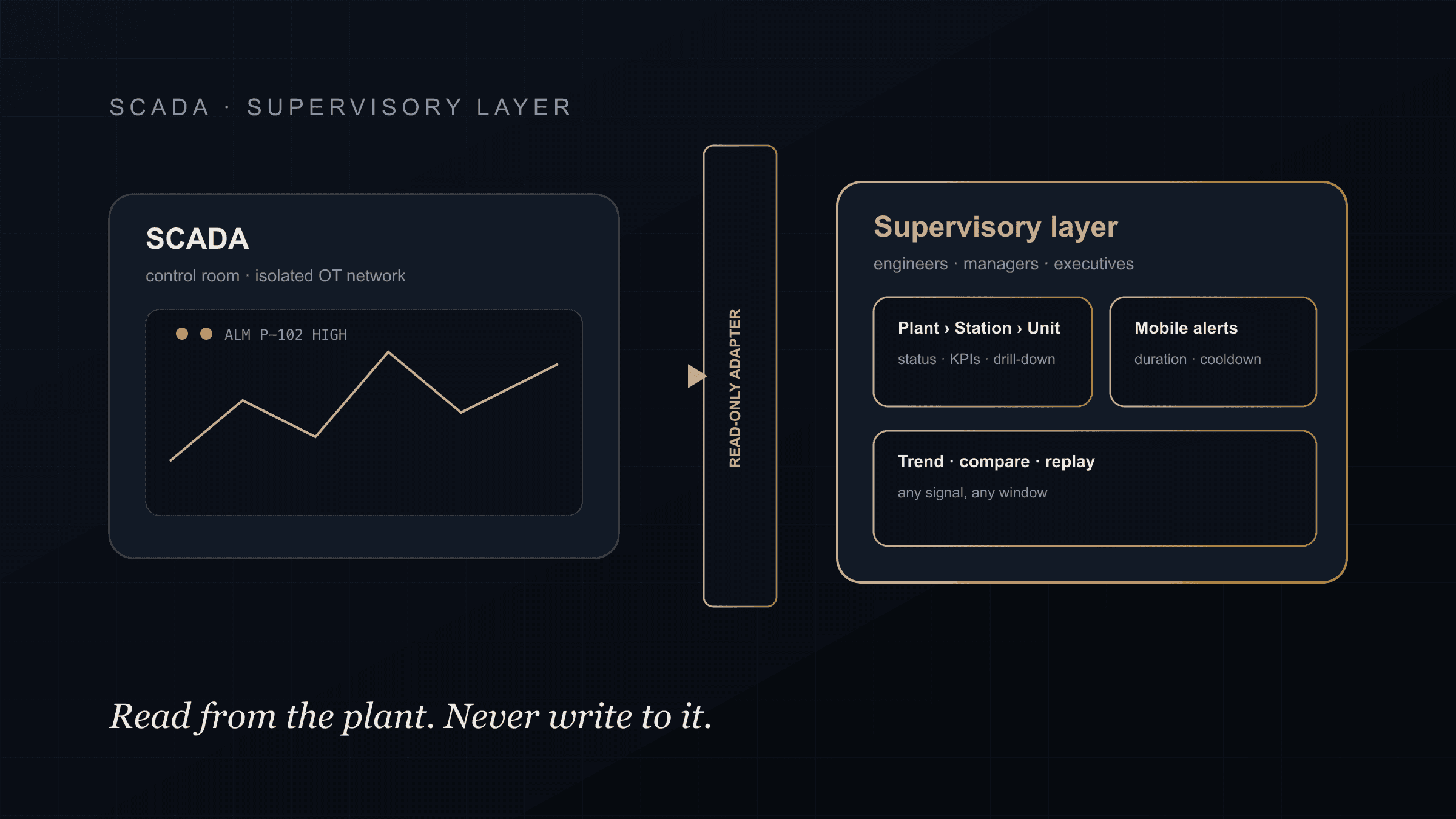
SCADA is not going anywhere. It controls the plant, and it should keep controlling the plant. The problem most operators have is not the SCADA. It is everything above it.
The screens were designed for a control room. The alarms page assumes someone is sitting in front of it. The trends live in the historian and take a specialist to pull. And the executive who wants one number by Monday gets a spreadsheet exported by hand on Friday.
A modern supervisory dashboard is the layer that fixes that, and the important part is what it does not do: it never writes to the controller.
What SCADA Is Good At
Supervisory control and data acquisition does three things well, and it does them in real time: it acquires signals from PLCs and RTUs, it shows operators what the plant is doing, and it lets them act on it. Set-points, interlocks, sequences, alarms.
That is control. It belongs on an isolated network, on hardened workstations, with change control on every modification. Nothing in this article argues for changing that.
Where the Gap Opens
The gap opens the moment someone outside the control room needs the data.
- An on-call engineer wants to know whether that alarm matters, from a phone, at 2 a.m.
- A plant manager wants unit availability for the week, not a screen full of tags.
- A regional director wants every plant on one page with the ones in trouble on top.
- An analyst wants to compare this month's unit performance to last year's, without asking the historian team.
Traditional SCADA answers none of these well, because it was never meant to. Bolting remote access onto the SCADA server to solve it is how control networks end up exposed.
What a Modern Supervisory Layer Adds
A supervisory layer sits above SCADA and the historian, reads from them, and serves the audiences the control room cannot.
Hierarchy, not tags. Plant, station, unit. Status and KPIs at every level, with drill-down from a national view to a single unit's hourly graph.
Alerts that reach people. Personal alert rules with a duration, a data-quality and freshness check, hysteresis and a cooldown, delivered to a phone with a durable inbox. Seen is not the same as recovered, and the system knows the difference.
Trend, compare and replay. Any signal, any window, compared across units or periods, replayable for incident review. No specialist required.
Executive views. Regional and asset KPIs, history and comparisons in a shared iOS and Android app, reading the same data model as the operator screens, so the numbers agree.
Reporting and integration. Historical, annual and peak reports, plus governed sync to ERP and maintenance systems.
This is the layer we build in our industrial automation practice, and it is the shape of the energy and utilities work we do for plants and grids.
The Rule That Makes It Safe
The supervisory layer is read-only by default.
It reads from the historian, or from an edge gateway, through adapters that cannot write back. Application data (alert rules, user preferences, report configurations) lives in a separate, client-approved store. PLCs and SCADA servers are never exposed to the internet. Access is role-based and logged.
Any control change stays where it belongs: scoped, on-site, and change-controlled. This is the same discipline we apply in OT/IT integration generally, and it is why the layer can be modern without making the plant less safe.
SCADA vs Supervisory Layer at a Glance
| SCADA | Supervisory layer | |
|---|---|---|
| Purpose | Control the plant | See and report on the plant |
| Audience | Control-room operators | Engineers, managers, executives, field teams |
| Writes to controllers | Yes | Never |
| Network | Isolated OT | Separate cloud or DMZ, read-only feeds |
| Alerts | Alarm list on screen | Personal rules to a phone, with cooldown and inbox |
| History | In the historian | Trend, compare, replay for anyone with access |
How to Start
Start with the data you already have. Most plants have a historian with years of signals nobody outside engineering can reach. A supervisory layer on top of it is often the highest-value, lowest-risk build available, because nothing in the control path changes.
We covered the executive side of this in executive plant reporting from historian data. If you want to see what the layer would look like on your plants, book a discovery call and we will walk through what you run today and what is missing above it.
FAQ
Does a modern supervisory dashboard replace SCADA?
No. SCADA keeps controlling the plant. A supervisory dashboard reads from SCADA and the historian to serve engineers, managers and executives outside the control room, and it never writes to a controller.
Is remote monitoring safe for a control network?
It is when the monitoring path is read-only and the control network stays segmented. Data leaves through a historian or edge gateway into a separate layer; nothing on the internet side can reach a PLC or SCADA server.
What is the difference between a SCADA alarm and a personal alert?
A SCADA alarm is shown on the control-room screen for operators. A personal alert is a rule an engineer or manager sets for themselves, with duration, quality checks and cooldown, delivered to their phone with an inbox that records when it was seen and when the condition recovered.
Can executives and operators use the same system?
Yes, with different views over the same data model. Operators get screens, alarms and trends; executives get regional and asset KPIs, history and alerts on mobile. Because both read the same record, the numbers agree.


