Connecting Make, HubSpot, and Claude is one of the most common AI CRM projects right now, and for good reason. It is technically straightforward and it does real work.
You can have Make watch HubSpot for a new contact, pass the record to Claude, get back a summary or a score, and write it into a HubSpot property. That is a legitimate improvement over doing it by hand.
But connecting tools is not the same as building an intelligent workflow. A wired-together stack passes data. A lead-to-revenue workflow passes context, with rules, evidence, and guardrails. This article is about the gap between the two, and how to close it.
The Common Stack
Here is the setup most teams build first:
- Make watches for a new HubSpot contact, deal, or form submission.
- Make sends the record to Claude with a prompt like "score this lead and summarize it."
- Claude returns a paragraph of text.
- Make writes that text back into a HubSpot note or property.
This is useful. It saves the rep a few minutes and gets a rough summary onto the record. For a low volume of clean leads, it is often enough to start.
The problem shows up when volume rises, data gets messy, and the outputs start driving real actions like task creation or sequence enrollment.
Where This Setup Breaks
The simple stack breaks in predictable ways:
- Weak input data. Claude only sees what HubSpot has. If the contact is just a name and email, the score is a guess dressed up as analysis.
- No ICP rules. Without an explicit definition of your ideal customer, "score this lead" means whatever the model infers that day.
- No shared memory. Each run is stateless. Claude does not know this is the fourth time this contact came back, or what was said last time.
- Outputs differ from run to run. A free-text prompt produces free-text answers. Two similar leads get scored differently, and nobody can explain why.
- No evidence trail. The note says "strong fit" but not why. When a rep disagrees, there is nothing to check.
- No approval gate. The workflow writes to the CRM and fires tasks with no confidence check, so a bad output becomes a real action.
- No feedback loop. Nothing captures whether the score was right, so the system never improves.
- No source of truth. HubSpot, Make, and Claude each hold a piece. There is no single record that represents the shared revenue context.
Each of these is survivable alone. Together they turn a helpful automation into a quiet source of bad data.
The Better Architecture
The fix is not a different tool. It is a workflow designed around shared context and structured output. Same three tools, more deliberate wiring.
1. Normalize incoming CRM data. Before anything reaches the model, standardize the fields. Clean the email, resolve the domain, unify formats. Claude should never see raw, inconsistent input.
2. Enrich missing company and person context. Fill the gaps the CRM left. Company size, industry, role, and recent intent signals, each attached with a source so it can be trusted later.
3. Apply ICP and qualification rules. Encode your ideal-customer definition as explicit rules, not as a vibe in a prompt. The model scores against your criteria, not its own.
4. Ask Claude for structured JSON output. Request a fixed schema, not a paragraph. Structure is what makes the output usable, comparable, and safe to route.
5. Write summary, score, next action, and evidence into HubSpot. Map each JSON field to a specific CRM property. The summary, the score, the suggested next action, and the evidence all land in known places.
6. Trigger tasks or sequences only when confidence is high. Use the confidence value as a gate. High confidence can run automatically. Lower confidence routes to a human first.
7. Log what was changed and why. Every CRM write records the input, the output, and the reasoning, so the system is auditable and improvable.
This is the difference between an automation that passes text and a lead-to-revenue system that produces CRM-ready context.
Example Structured Output
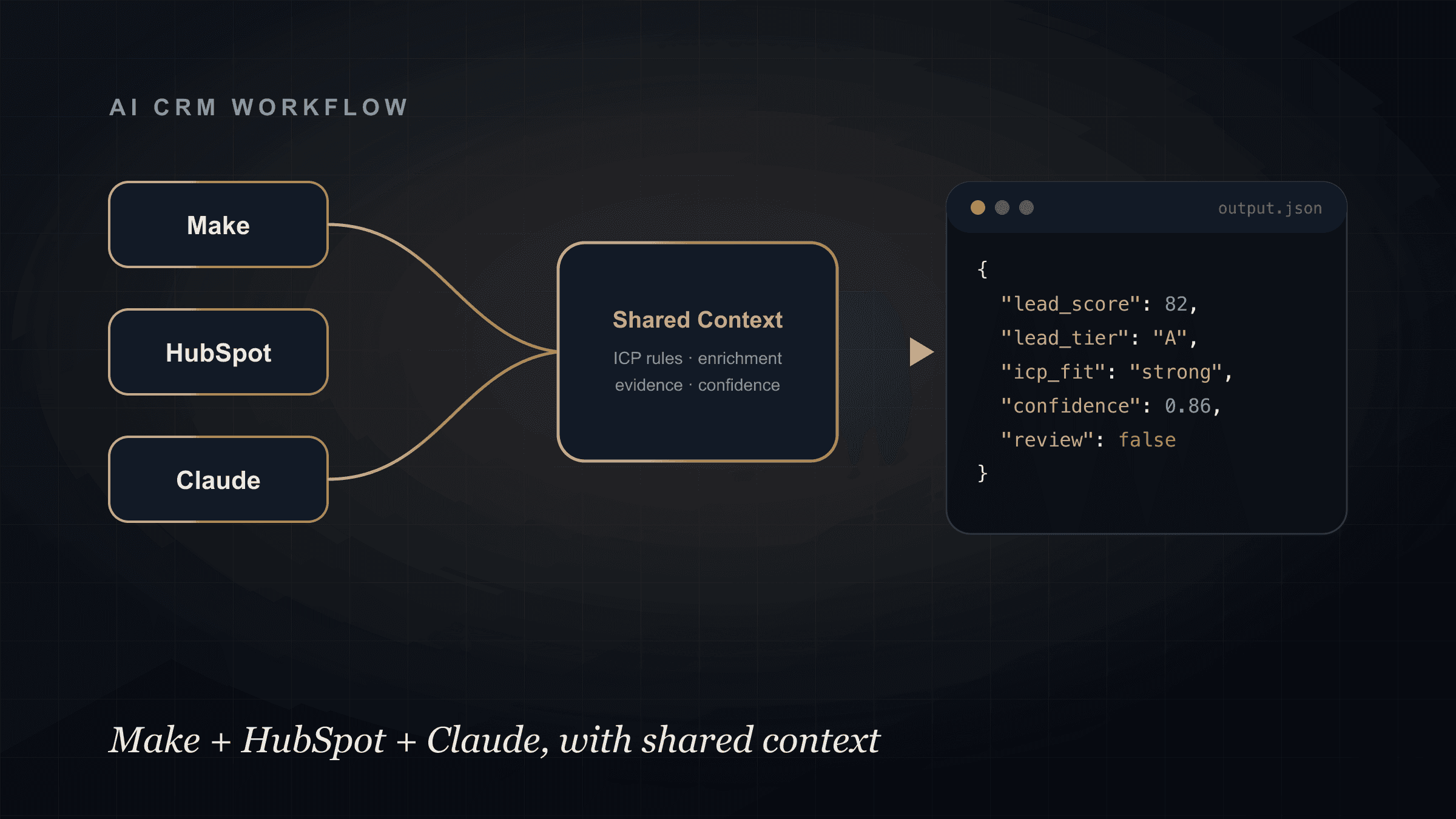
Instead of a paragraph, ask the model to return a fixed shape your automation can act on:
{
  "lead_score": 82,
  "lead_tier": "A",
  "icp_fit": "strong",
  "likely_pain": "manual follow-up and CRM fragmentation",
  "suggested_next_action": "send consultative follow-up",
  "crm_note": "B2B services founder, ~20 staff, running paid ads with slow follow-up. Asked about connecting form leads to CRM and AI follow-up.",
  "confidence": 0.86,
  "requires_human_review": false
}
Now Make has something to reason about. It can map lead_score to a HubSpot property, route lead_tier A leads to a rep, only enroll a sequence when confidence is above your threshold, and hold anything where requires_human_review is true.
Structured output is what turns "Claude wrote a note" into "the system took a governed action."
Guardrails
An AI-in-the-loop CRM workflow needs guardrails before it touches live data:
- Never let AI overwrite important fields without rules. Scores and notes can be written freely. Lifecycle stage, owner, and deal amount should be protected.
- Dry-run before live sync. Run the workflow against real records in a preview mode and review the output before anything writes to the CRM.
- Store source evidence. Every enrichment and every claim carries a source, so a rep can verify it.
- Use confidence thresholds. Below the threshold, the action is suggested and queued, not executed.
- Require human approval for sensitive actions. Anything that emails a prospect, changes a deal, or reassigns an owner is previewed and approved.
- Log every CRM write. Keep a record of what changed, when, and why.
These are not bureaucracy. They are what let you trust the system enough to actually use it at volume. This is the same principle behind avoiding fragmented GTM: context and control travel with the lead.
How Technovier Builds This
Technovier builds governed CRM and lead-to-revenue systems as an implementation partner, not a plugin.
For a Make plus HubSpot or HighLevel plus Claude or OpenAI project, that means designing the normalization and enrichment steps, encoding your ICP and qualification rules, building the prompt and structured-output layer, mapping every JSON field to the right CRM property, setting confidence thresholds and approval gates, running a dry-run process before go-live, and standing up a reporting dashboard so you can see what the system is doing.
The goal is a workflow you can trust with real pipeline, not a clever demo that quietly writes bad data.
For the strategic picture of how this connects to your full motion, see the CRM AI Automation page. For the post-click side, see how to stop lead leakage after ads.
Need a Safer Make + HubSpot + Claude Workflow?
If you already have a Make, HubSpot, and Claude connection and it feels fragile, that is usually an architecture gap, not a tooling gap.
Technovier can design the architecture, the prompt layer, the CRM field mapping, the dry-run process, and the reporting dashboard so the workflow is governed and auditable.
Explore an automation build and we will review your current setup and map the safer version.
FAQ
Can you connect Make, HubSpot, and Claude?
Yes. Make can watch HubSpot for new records, send them to Claude for scoring or summarization, and write the result back into HubSpot. The connection is straightforward. The harder part is designing it so the outputs are consistent, evidence-backed, and safe to act on.
Why is connecting the tools not enough?
A basic connection passes data without shared context, ICP rules, structured output, or guardrails. That produces inconsistent scores and unexplained notes. An intelligent workflow adds normalization, enrichment, rules, structured JSON, and confidence gates so the output can drive real actions safely.
How do you stop Claude from writing bad data into the CRM?
Use structured output, confidence thresholds, protected fields, a dry-run stage, human approval for sensitive actions, and a log of every CRM write. Low-confidence outputs are queued for review instead of executed automatically.
Does this work with HighLevel instead of HubSpot?
Yes. The same architecture applies to HighLevel. The tools change, but the pattern of normalize, enrich, score, structure, gate, and log stays the same.