At a glance
What we built
Creators Beats brings track discovery, artist profiles, playlists and music licensing into one experience.
| Product | Creators Beats |
|---|---|
| Interfaces shown | Desktop / web |
| Technology | Music marketplace · Web product design |
| Core work | Search by genre, mood, instrument and BPM · Track previews, playlists and favourites · Licensing, cart and composer-upload journeys |
Product flow
How it works
Search by genre, mood, instrument and BPM
Track previews, playlists and favourites
Licensing, cart and composer-upload journeys
The interface
Inside the product
Desktop interface · 01
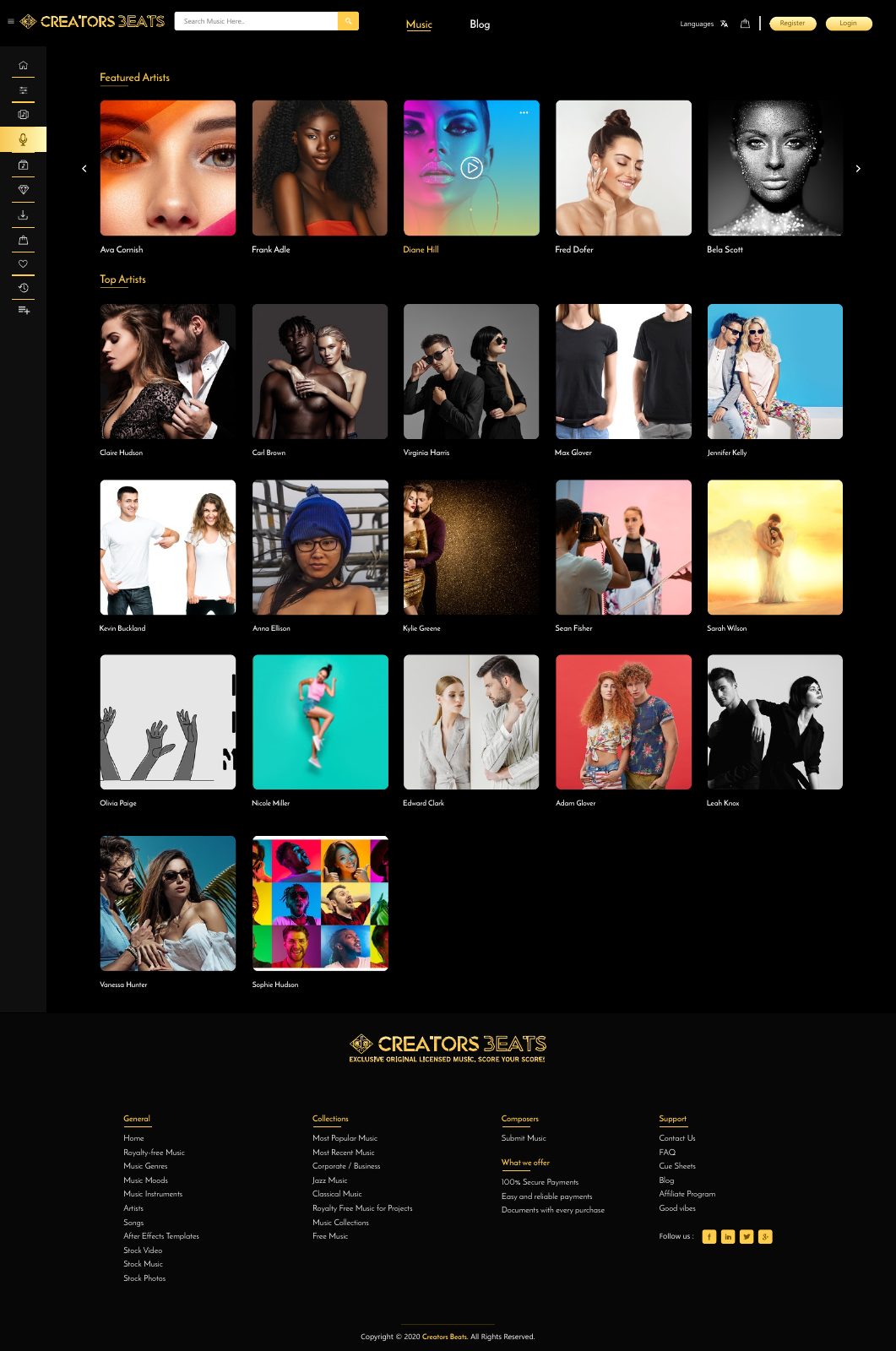
Browse the artists
The approved interface gives artist discovery its own image-led catalogue and routes into individual profiles.
Desktop interface · 02
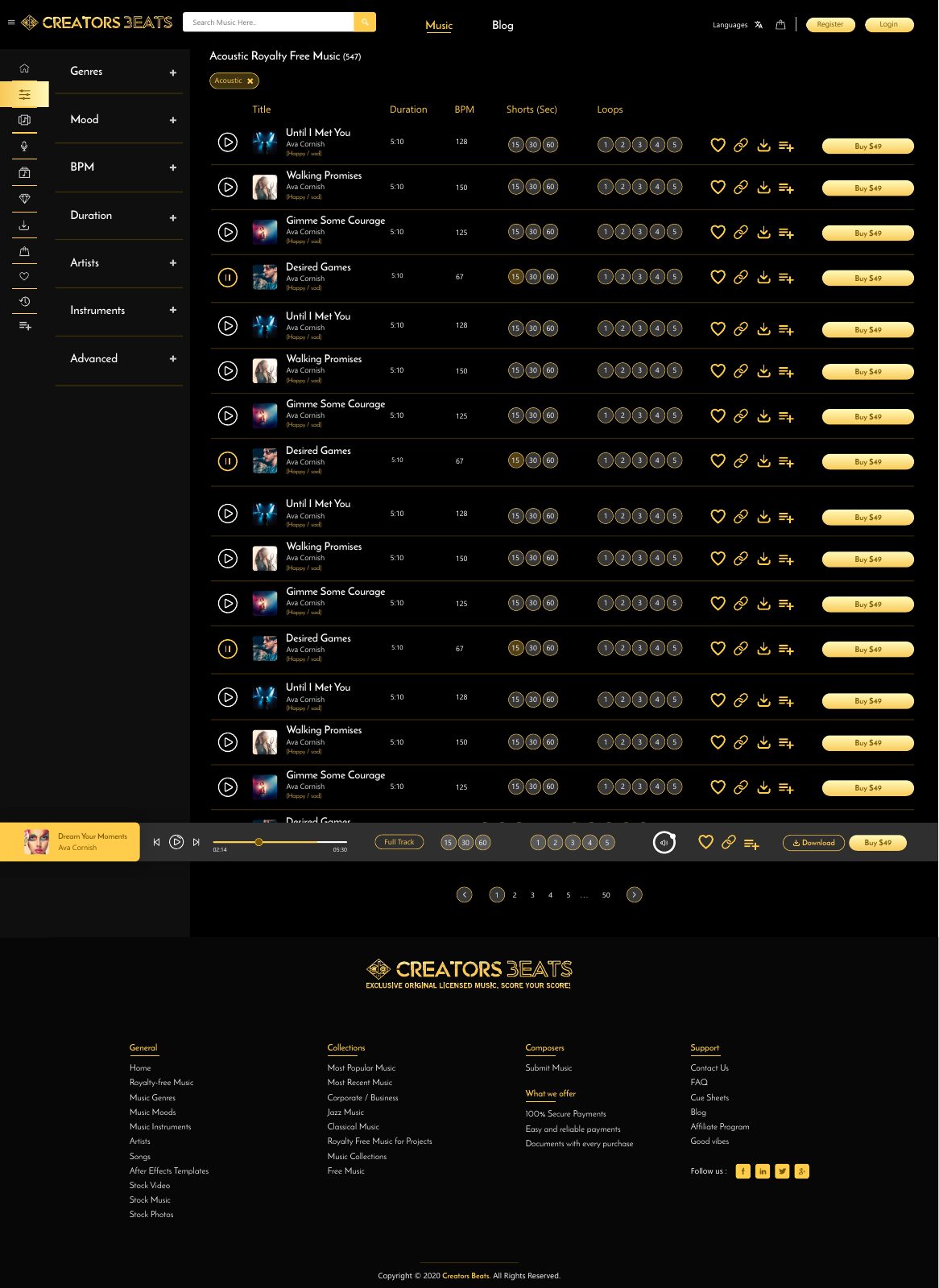
Filter and preview tracks
Genre, mood, BPM and instrument controls sit beside track rows, with an audio player retained across the results.
Design notes
Decisions behind the experience
Music discovery
Let a buyer search by the sound a project needs
- Creative filters
- Inline preview and track information
Read the context
A music buyer may know the mood, pace or instrument before knowing an artist. The marketplace design puts genre, mood, BPM, duration, artist and instrument filters beside the catalogue so the search can begin with creative intent.
Track rows then bring the comparison into one view: title, timing, tempo, edit lengths and a way to listen before committing to a licence.
From preview to licence
Keep consideration and purchase close together
- Track preview player
- Favourites and purchase path
Read the context
A persistent audio player lets the visitor listen while moving through results. Favourites, playlists and queue actions support a shortlist; the buy action belongs to the chosen track and version.
That sequence helps a creator compare options without losing the track they were testing. The design treats the licence decision as the end of a listening journey, not an isolated price button.
Catalogue operations
Give artists and composers a route into the library
- Artist profiles
- Composer and collection paths
Read the context
Artist pages collect their tracks and story in one place. The wider design includes composer submission, collections and support pages, which give the marketplace a path for catalogue growth as well as customer discovery.
Organising tracks by attributes and ownership is important because the same music must be findable through search, an artist profile and a collection.
Visual system
Make a dense music library readable
- Persistent player
- Dense but legible track table
Read the context
The approved desktop design uses a dark canvas and restrained gold controls. It separates the filter rail, track table and playback bar, so the repeated rows remain scannable during a long listening session.
The player stays available while the catalogue changes. This turns browsing into a continuous listening experience rather than restarting playback on every page.
Design and development
What powers it
Platform and technology
Music marketplace · Web product design
Core capabilities
- Search by genre, mood, instrument and BPM
- Track previews, playlists and favourites
- Licensing, cart and composer-upload journeys
Questions about the product
Questions about this product
What does this product help people do?
Find music by mood, genre and tempo, then preview the right track before licensing it.
Which screens can I explore?
Browse the artists, Filter and preview tracks.
What capabilities are covered?
Search by genre, mood, instrument and BPM, Track previews, playlists and favourites, Licensing, cart and composer-upload journeys.
Commerce & Platforms projects