At a glance
What we built
heyfon.ai brings assistant configuration and business call handling together in a voice-enabled customer experience.
| Product | heyfon.ai |
|---|---|
| Interfaces shown | Desktop / web |
| Technology | React · Voice AI · FastAPI product architecture |
| Core work | Conversational assistant configuration · Business-call and communication workflows · Integrations and customer onboarding |
Product flow
How it works
Conversational assistant configuration
Business-call and communication workflows
Integrations and customer onboarding
The interface
Inside the product
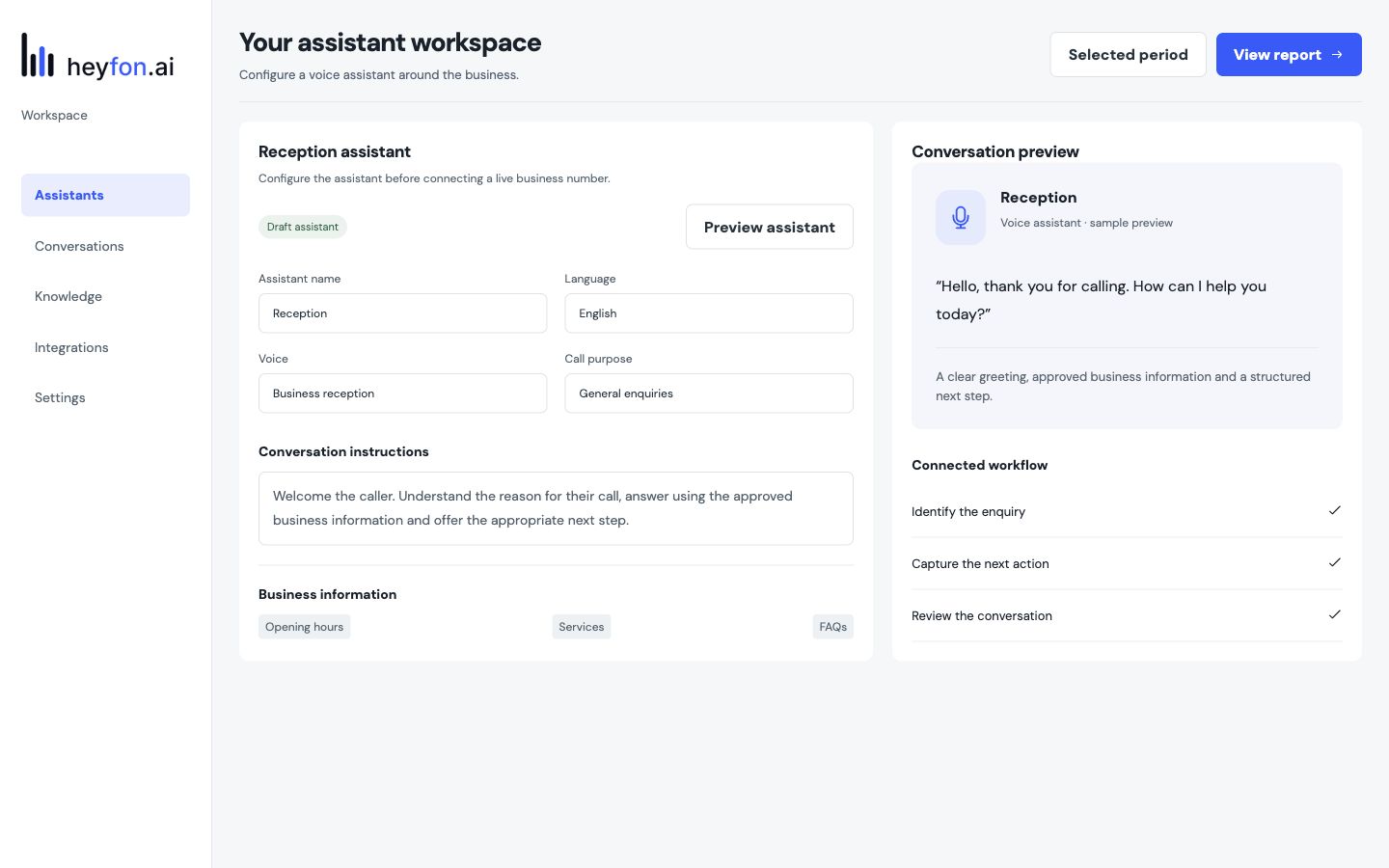
Desktop interface · 01
Conversational assistant configuration
Design notes
Decisions behind the experience
The service problem
Keep a business conversation from ending at a missed call
- Business knowledge
- Call handling rules
- Booking and handoff
Read the context
A caller may want an answer, an appointment or a person who can handle a more complex request. The receptionist product gives a business a configurable first response so those calls can begin with useful context rather than a generic voicemail.
The product setup is as important as the voice. The business needs to define what the assistant can answer, when it can book and where a request should go next. The interface turns those decisions into manageable settings instead of leaving every change as an engineering task.
Caller journey
Respond, qualify and move to a useful next step
- Natural call entry
- Relevant qualification
- Calendar booking or team follow-up
Read the context
The assistant opens the conversation, handles common questions and gathers enough detail to understand what the caller needs. A straightforward appointment can move into the connected calendar; a request needing a person can be routed with context for follow-up.
That creates a clearer path from acquisition to service. The first call is not just a recording; it becomes a structured enquiry with the caller's intent and the next action visible to the team.
Business operations
Give staff control over what happens after the call
- Assistant configuration
- Calendar and customer-system connections
- Follow-up visibility
Read the context
The operator needs to know what the assistant was told, which calls produced appointments and which conversations still need a human response. Onboarding and integrations connect the assistant to the business's existing calendar and customer workflow.
The product distinguishes configuration from live handling. Staff can update business information and routing rules as services or hours change, while the caller continues to experience one coherent conversation.
Interface and build
A voice product with an understandable control surface
- React operator interface
- Voice service and application API
- Configuration tied to follow-up
Read the context
The configuration screens organise business details, call behaviour and integrations as operator decisions. That gives a team a way to shape the receptionist without asking them to understand the orchestration behind every turn of a call.
The product architecture combines a React control interface with voice services and a FastAPI-backed application layer. The design work focuses on making the handoff between spoken conversation and staff action clear enough to operate day to day.
Design and development
What powers it
Platform and technology
React · Voice AI · FastAPI product architecture
Core capabilities
- Conversational assistant configuration
- Business-call and communication workflows
- Integrations and customer onboarding
Questions about the product
Questions about this product
What does this product help people do?
Shape a business call around an assistant that can answer, qualify and route a conversation.
Which screens can I explore?
Conversational assistant configuration.
What capabilities are covered?
Conversational assistant configuration, Business-call and communication workflows, Integrations and customer onboarding.
AI & Workflow projects