An email dashboard can show more opens even when nobody new has looked at a message. A tracking pixel may be fetched by a privacy feature, or a previously received event may be processed again after a retry. Those are different problems. Email open tracking duplicate events concern the second: the same underlying event appears more than once in the data used for reporting.
The distinction matters because a raw event row, a reported open, and a human read answer different questions. Cleaning up duplicate rows can make a dashboard internally consistent. It cannot, by itself, prove that a person read the email or that a campaign generated a meeting.
What an open counter actually measures
Open tracking usually starts with a small remote image in an HTML email. When an email client requests that image, the sender's system can record a request. Mailchimp's explanation of open and click rates describes this pixel-based approach and notes that image blocking can also cause opens to be missed.
A request is an observation, not a statement of intent. Apple's Mail privacy settings explain that Protect Mail Activity can download remote content in the background when a message arrives, instead of waiting for a person to view it. Mailchimp's bot-activity guidance describes automated security checks that can affect engagement reports too. Meanwhile, a person can genuinely reopen the same message. A sound audit must avoid treating every repeated request as a software duplicate or every accepted request as a human read.
Use separate names for each layer of the pipeline:
| Layer | What it counts | What it cannot establish |
|---|---|---|
| Pixel requests | Requests received for the tracking image. | That a person viewed the message. |
| Stored event rows | Records written by the collector or a downstream processor. | That every row represents a distinct request. |
| Distinct source events | Requests or provider events after verified replay duplicates are collapsed. | That an automated fetch was a human open. |
| Recorded opens | Events included under a documented dashboard counting rule. | That the recipient read or understood the message. |
| Replies, meetings, or sales | Separate downstream outcomes with their own evidence. | That an open caused the outcome. |
This is why the event table and the workspace open-count metric should be inspected separately. A source row can be retained for diagnosis while excluded from the dashboard's reported-open count. The reporting rule should say whether it counts total events, unique messages with at least one eligible event, or another defined unit.
Two errors that can look like one spike
An automated fetch is a classification problem. The image request happened, but it may have been made by a privacy or security service rather than a reader. Apple Mail Privacy Protection is a documented example. A classifier may mark a request as automated or uncertain, but it should preserve the original observation and the reason for its decision. It should not quietly rename a machine request as a human action.
A replay is a processing problem. A collector or queue can deliver an already received event again when an acknowledgement fails or a retry occurs. If each delivery inserts another stored row or increments a counter, the dashboard may rise without another image request. Microsoft's guidance on resilient event processing describes why systems with at-least-once delivery need idempotent consumers: processing the same input twice should not produce two effects.
A real second open, by contrast, is a new source request. It may or may not qualify under a dashboard's rules, but it should not be collapsed merely because it concerns the same email. The key audit question is whether two rows represent the same source event delivered twice or two separate source events.
How a replay changes the number
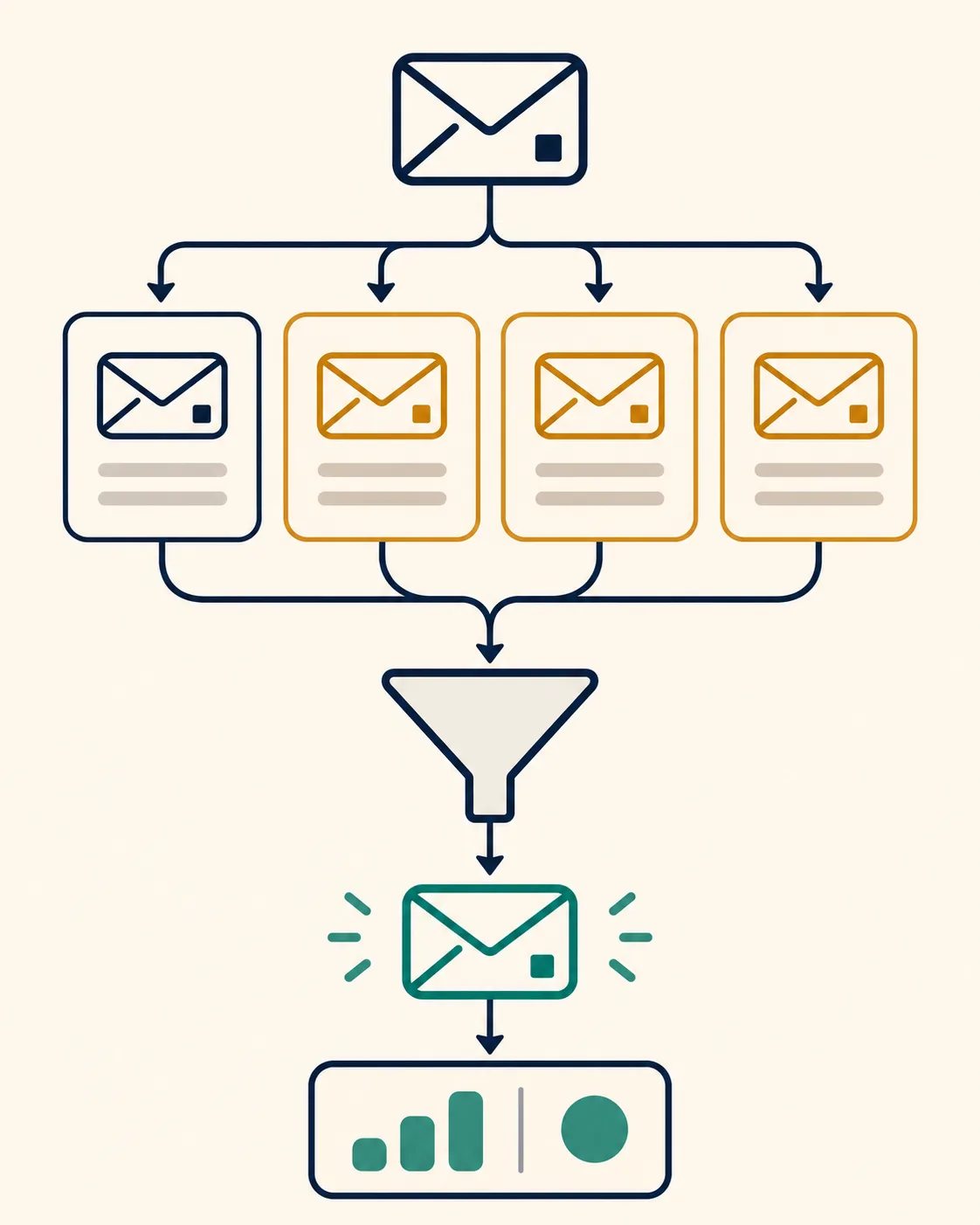
Consider an illustrative sequence. One image request reaches a collector. Its event is written once, but a downstream processor receives that same event three more times after a failed acknowledgement. A naive insert-on-receipt design now has four rows for one source event. A naive counter that increments on every receipt may also show four opens.
After replay deduplication, the system has one distinct source event. A separate classification step must still decide whether that event meets the rule for a recorded open. The number of human reads remains unknown.
The safest event identity is a stable source or provider event ID that survives retries. If that is unavailable, a carefully defined key using message identity, event type, original event timestamp, and other stable source fields can help. An ingestion timestamp alone is a poor key because it changes on each replay. A message ID alone is too broad because a person may open the same message more than once. Document the key and inspect edge cases before applying it to historical data.
A read-only audit checklist
Before changing counters, take a bounded sample and reconcile the layers above. A useful audit answers these questions:
- What period and population are in scope? Name the workspace, message cohort, event types, and time window internally. Keep private identifiers out of public reporting.
- What is the source event? Compare original event IDs or stable source fields with ingestion times. Repeated ingestion times are not proof of distinct source activity.
- Where can replay occur? Trace receipt, queue delivery, acknowledgement, storage, and aggregate update. Look for a batch returned after an attempted acknowledgement or a retry after a timeout.
- How are rows classified? Keep replay deduplication separate from automated-fetch classification. Do not assume every automated open is a replay.
- What does the dashboard sum? Recalculate from the defined eligible events and compare that value with the saved metric. Check total opens separately from unique opened messages.
- What changed after a proposed repair? Compare row counts, distinct source events, excluded events, and dashboard values before and after. Keep a reversible record of the original values and the reason for each exclusion.
A large drop in stored rows is not necessarily the same as the drop in the dashboard metric. Rows can span different periods, event types, or messages, while a particular chart may count only a subset. State the denominator and scope of each number before comparing them.
Repair the counting path, then read it back
The durable fix is to make repeated delivery safe. The ingestion path should recognize a stable event identity, write a source event once, and avoid incrementing a summary twice for the same event. Acknowledgements and retries should be tested together: a successful write followed by a lost acknowledgement must not create another count on the next delivery. The original raw evidence can remain available for audit while the dashboard is rebuilt from eligible, distinct events.
A historical correction also needs a read-back check. Recompute the metric for the affected cohort, compare it with the stored summary, and inspect a few messages at the boundary of each rule. Then test a normal first event, an exact replay, a genuine later request, and an automated fetch. Monitoring should alert on a widening gap between raw receipts, distinct source events, and recorded opens.
The broader lead-to-revenue system benefits from clear event definitions, but a repaired open counter should not be promoted into a revenue claim. The same caution applies to lead scoring: an open is a weaker signal than a reply or a verified meeting, and even clicks can be affected by automated checks. Our earlier guide to Meta lead attribution makes a related point about preserving the event and its source before relying on a summary. For teams planning email marketing, the first reporting decision is what each metric is allowed to mean.
FAQ
Does deduplicating events reveal the true number of human opens?
No. It can remove repeated processing of the same source event. Privacy downloads, security checks, image blocking, and genuine repeat views still limit what a pixel can tell you about readership.
Are two pixel requests for one message always a duplicate?
No. They may be two distinct source requests, including a real reopen. Verify the source event identity before collapsing rows. A dashboard may choose to report unique opened messages separately from total eligible requests.
Should automated opens be deleted from the event log?
Usually the useful distinction is between retaining the observation and excluding it from a metric that claims to represent engagement. Keep the classification reason and original event available for a bounded audit, subject to the organization's retention rules.
How can a team tell whether a dashboard was inflated by replay?
Compare original event identities and timestamps with ingestion rows and aggregate updates. If the same source event was written or counted repeatedly after retries, the count needs correction. Check the affected population and time period before generalizing the result.
What should a repaired dashboard say?
Name its unit and rule: for example, eligible recorded opens or unique messages with an eligible open. Show raw receipts and excluded events separately when investigating quality. Do not label the corrected count as confirmed human reads or recovered revenue.