A campaign link can look plausible and still have utm_mediun where utm_medium should be. It can also carry two different utm_source values, or omit the campaign name entirely. Those mistakes are visible before anyone clicks the ad. A short campaign URL QA pass can catch them while the link is still easy to change.
Start with the link text: check the destination URL and the campaign parameters. Then test the destination, conversion step, and eventual record separately. A clean URL string does not prove that a redirect preserves it, a form stores it, or an analytics report interprets it as intended.
Google’s custom campaign URL guidance recommends using utm_source, utm_medium, and utm_campaign together. Source identifies where traffic came from; medium describes the channel; campaign groups the initiative. utm_content and utm_term can add useful detail when the team has a clear naming rule. The question for a prelaunch check is whether the link actually contains the intended names and values.
What a pasted-link check can establish
Technovier’s UTM Builder has a Check a pasted link mode alongside its link builder. The check reads the URL in the browser. It does not visit the destination or send the pasted URL to Technovier. It reports missing core fields, common misspellings, duplicate UTM keys, mixed key casing, and values whose spaces or casing may fragment a report.
| Check | What it can reveal | What remains unproved |
|---|---|---|
| URL syntax | Whether the input is a full HTTP or HTTPS URL | Whether the page responds |
| Core UTM fields | Whether source, medium, and campaign have nonempty values | Whether the values match the campaign plan |
| Duplicate fields | Whether the same field appears twice, including conflicting values | Which conflicting value the operator intended |
| Naming consistency | Whether keys use lowercase and values contain casing or spaces to review | Whether the chosen naming convention fits every reporting system |
The checker may offer a suggested clean link when the core fields are present and duplicates do not conflict. It trims values, uses lowercase UTM names and values, turns internal spaces into underscores, removes identical duplicate fields, and corrects recognized spelling mistakes. Other query parameters and the URL fragment stay in place. Review that suggestion before copying it: normalization is a proposed edit, not evidence that the campaign owner wanted a new naming convention.
If two copies of a field disagree, the checker withholds a suggested URL. That is deliberate. A tool cannot know whether utm_source=meta or utm_source=google is correct for the placement.
Six small tests of the checker
We ran six local implementation tests against the checker. These are synthetic URL fixtures, not client campaign results or evidence of better attribution. They establish the behavior of the check, not the behavior of an ad platform, browser journey, analytics account, or CRM. All six passed in this revision.
| Fixture | Expected result | Observed result |
|---|---|---|
Complete source, medium, and campaign with an unrelated ref parameter and fragment | No text-level finding; preserve ref and the fragment | Passed |
| Empty medium and absent campaign | Report both missing core values; offer no clean link | Passed |
utm_mediun in place of utm_medium | Flag the typo and suggest the corrected key | Passed |
| Two identical source values with different casing | Flag the duplicate and keep one normalized source | Passed |
| Two conflicting source values | Require a human choice; offer no clean link | Passed |
Uppercase source key, spaces in values, and a gclid | Flag naming issues; preserve gclid in the suggestion | Passed |
The duplicate distinction matters. The browser’s URLSearchParams interface can represent repeated query parameters. Reading only the first value would hide a disagreement in the link supplied to a campaign. QA should surface that ambiguity rather than silently choose a source.
Consider this synthetic input:
https://example.com/offer?utm_source=Meta&utm_mediun=Paid%20Social&utm_campaign=Winter%20Launch
The typo prevents a literal utm_medium field from appearing in the pasted link. A suggested version uses utm_medium=paid_social and utm_campaign=winter_launch. That suggestion may fit a team’s naming rules, but the campaign owner should confirm the source, medium, campaign name, and actual landing page before placing it in an ad.
Finish the journey in four separate checks
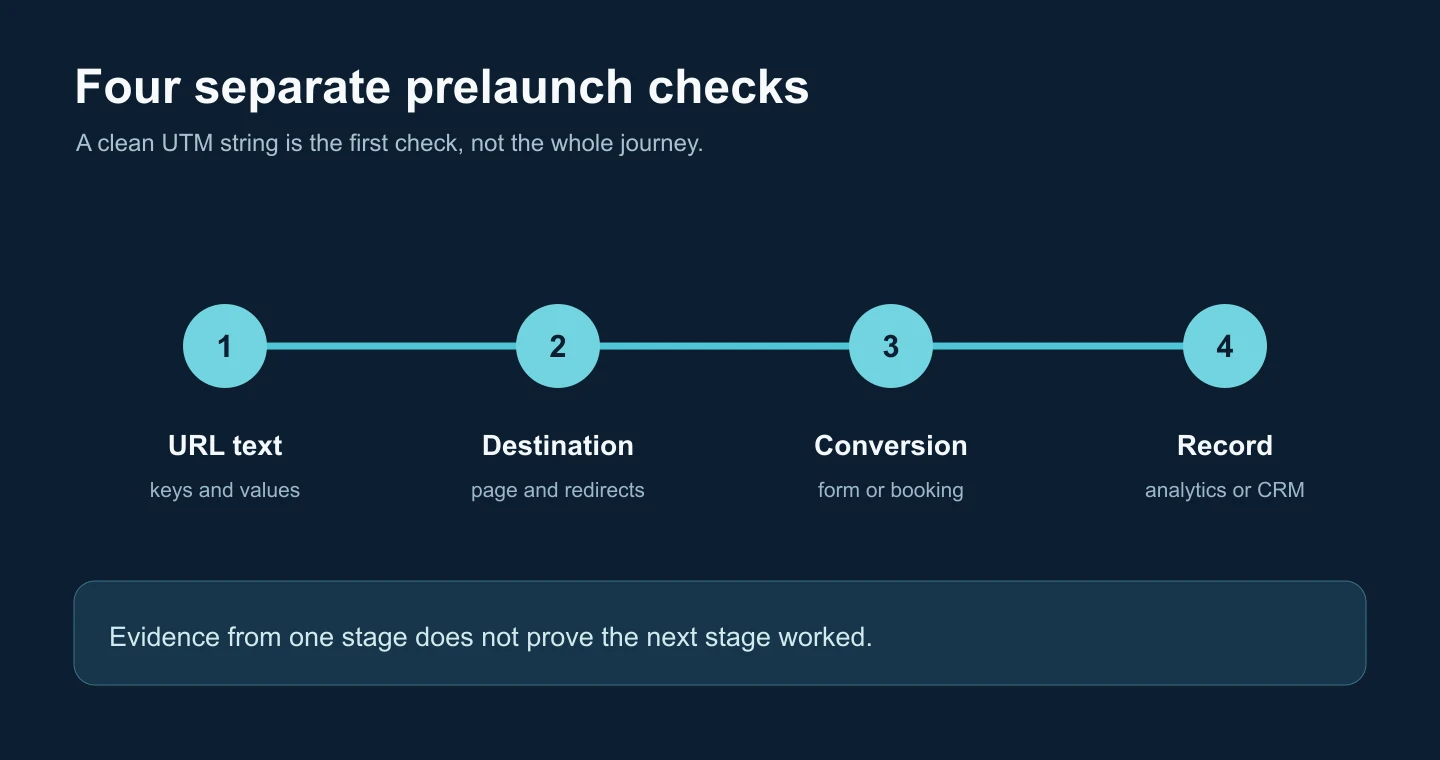
1. Inspect the URL text. Paste the exact link that will be used. Resolve missing, misspelled, or conflicting values. Compare the values with the campaign naming sheet or brief. A syntactically valid value can still be the wrong campaign.
2. Open the destination. Follow the actual link and confirm it reaches the intended page. Check whether redirects or link shorteners preserve the parameters. A text checker cannot establish that. For a bounded live destination check on 28 November 2026, a synthetic tagged request to Technovier’s /tools/utm-builder returned HTTP 200 at the same tagged URL. That response confirmed this one server-side request path; it did not test an ad click, browser script, form, or analytics report.
3. Test the conversion step. If the campaign asks for a form submission or booking, use a clearly marked test record and inspect what that step actually captures. Avoid assuming the presence of a parameter in the landing URL means it will appear on a later form page. The test should include the same navigation and form steps that a real visitor would take.
4. Inspect the resulting record. Where permitted, check the analytics campaign dimensions and the submitted contact or booking record. Record the test ID, time, expected fields, and observed fields. If the destination URL is right but the record is missing campaign values, investigate that handoff rather than rewriting a correct link.
Each step answers a different question. A passing URL check should not be reported as a passing end-to-end attribution test. Our Meta-to-GoHighLevel attribution guide explains why a stored source label also needs an evidence level before it supports a channel claim.
A practical prelaunch handoff
The person building the campaign should hand over the exact final link, the intended placement, and the agreed source/medium/campaign values. The reviewer can record a small decision table:
| Item | Record before launch |
|---|---|
| Link | The exact URL placed in the campaign |
| Naming rule | Expected source, medium, campaign, and optional content/term |
| URL QA | Findings resolved or explicitly accepted |
| Destination | Final page and whether parameters remained after redirects |
| Conversion | Test submission or booking ID, if this path requires one |
| Record | Observed analytics and CRM fields, with any unknowns left visible |
This is intentionally small. A source label cannot by itself prove that an ad caused a booking. The goal is to prevent a known text mistake, make the next test repeatable, and leave a clear trail when a later stage does not match expectations.
FAQ
Are all UTM fields required?
Google recommends utm_source, utm_medium, and utm_campaign for custom campaign links. Additional fields such as utm_content and utm_term are useful when they distinguish creative, placement, or keyword detail your team will actually analyze. Agree on the convention before launch.
Can a checker fix a misspelled field automatically?
It can suggest a correction for recognized mistakes such as utm_mediun. Review the suggestion against the campaign plan, especially when the original URL includes conflicting values. A tool cannot infer the intended placement from a typo alone.
Does a valid UTM link prove attribution works?
No. It proves only the checked properties of the URL text. Redirects, page scripts, forms, analytics processing, and CRM mappings are separate stages. Test each stage that matters to the campaign.
Should the team re-tag historical links when naming rules change?
Treat that as a reporting decision. Changing live links can split a campaign’s history across names. Document the old and new values, decide when the new rule begins, and avoid presenting the combined report as one unchanged series.
Does the pasted-link check send my URL to Technovier?
No. The check runs in your browser and does not request the destination page. If you later open the link yourself, that is a separate request to the destination site.
Before the next launch: run the exact final link through the UTM Builder’s pasted-link check, then complete the destination and conversion checks relevant to that campaign. Keep the evidence for each stage separate.